
Concepts is a sketching app for iPhone, iPad, and Android with an infinite canvas, so your notes can grow in any direction instead of stopping at the bottom of a page. It's our pick for concept maps and visual notes in the roundup of the best note-taking apps for iPad, and I tested it on my iPad during a week of statistical research.
I'm a visual learner, so my notes are full of tiny icons, arrows, and the occasional comic strip instead of tidy Cornell-style questions. Concepts was the most fun app I tested, and it's the one I'd hand to any creative analytical or analytical creative.
- Free, with paid upgrades available
- Infinite canvas, editable strokes, and a huge color wheel
- Available for iPhone, iPad, and Android
What is Concepts?
Every stroke in Concepts stays editable, which means you can move, resize, or recolor a doodle long after you've drawn it. Concepts is a natural fit for brainstorming because you never have to decide where an idea goes before you write it.
Keep the T-Mobile coverage, drop the T-Mobile price
Big carriers charge a premium for the same towers their MVNO partners use. T-Mobile MVNOs run on the same network as the major carrier, often for about half the price, so switching frees up cash for your next app upgrade or stylus.
Check out the most popular T-Mobile MVNO plans right now:


Your concept map never runs out of room
Start with a main topic in the center, zoom out, and write subtopics around it, then keep zooming out until your map covers an entire semester. You can also build to the right, the left, up, or down, so a single idea can branch into a dozen connected notes without you flipping pages.
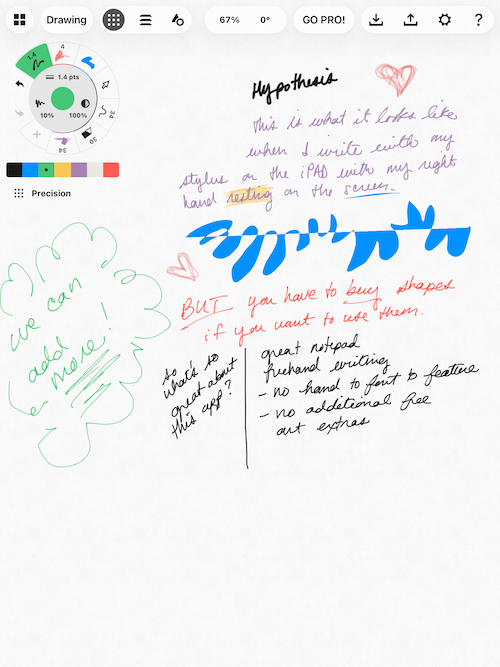
Image: Jessica Santero | WhistleOut
The color wheel spins as far as your palette needs
Concepts has an incredible color palette, and swapping shades is super easy. You can spin the entire color wheel to land on the exact tone you want, which is perfect for color coding topics or giving each comic character a signature look. Color coding by subject also makes a giant map easier to scan when you zoom all the way out.
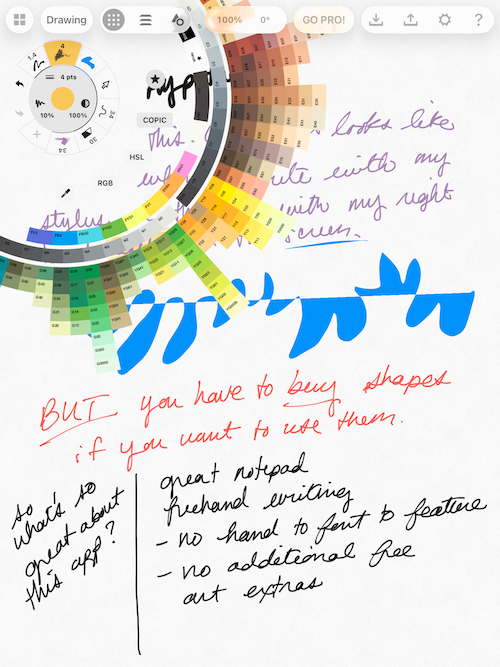
Image: Jessica Santero | WhistleOut
Turn your notes into comics
If you like turning your notes into comics like I do, Concepts is honestly the best app for it. The infinite canvas gives each panel as much room as it needs, and editable strokes let you redraw a character without erasing the whole scene. Daily doodling wears down your iPad screen faster than you'd think, and a screen protector has kept mine scratch free since 2018.
Not sure how to update your apps?
Keeping your apps up to date ensures you're always getting the latest features, bug fixes, and security improvements. Learn how to update the apps on your iPhone and your Android. It takes less time than you think.
Do you need to pay for Concepts?
If you don't mind drawing shapes by hand and doodling freely, the free version covers everything you need for visual notes. Shapes and other add-ons for your canvas sit behind a paid upgrade, and that's my main gripe with Concepts.
Who should upgrade
Students who want clean diagrams for presentations will get more out of the upgrade, while sketchers and comic makers can stick with free.
Who should download Concepts
Concepts is best for visual learners, artists, and anyone whose notes branch out instead of running in a straight line. Traditional notetakers who want lined pages, notebooks, and planners will be happier in Goodnotes or Notability. Since the basic version is free on iPhone, iPad, and Android, you can sketch your next study session there before deciding on any upgrade.
 How I tested Concepts
- Built concept maps on the infinite canvas by zooming out and branching subtopics in every direction.
- Tested the color wheel and editable strokes while drawing icons and comic style notes.
- Checked which tools sit behind the paid upgrade to see whether the free version holds up.
Concepts: FAQ
What is the best app for concept maps on iPad?
Concepts is the best app I tested for concept maps on iPad because its infinite canvas lets your map grow in any direction.
Is Concepts free?
Yes, the basic version of Concepts is free, and paid upgrades unlock extras like shapes. Current pricing is listed on the App Store and Google Play pages.
What is an infinite canvas?
An infinite canvas is a workspace with no page edges, so you can keep zooming out and drawing in any direction.
Is Concepts good for note-taking?
Concepts is great for visual notes, concept maps, and doodles, but it isn't built for traditional lined notebooks.
Does Concepts work on Android?
Yes, Concepts is available on Android as well as iPhone and iPad.
Why you can trust WhistleOut
.svg)
15+
years of mobile industry experience

900+
published wireless guides

35+
firsthand carrier reviews
We've been around since the birth of the iPhone. Along the way, we've learned how to spot the best deals for your wallet (and your sanity). We spend our days researching informative guides and writing insightful reviews on every kind of wireless plan, distinguishing what matters from what doesn't. We played around with these plans before recommending them, ensuring they're worth your hard-earned money.
Want to know more? Check out how we review every cell phone plan we rank.
Jessica Santero
Staff Writer

Thousands of cell phone plans unpacked. All the facts. No surprises.

Related Articles


Related Topics
App Reviews FeaturedPopular Topics
Featured App Reviews iOS News Coverage Device Reviews Device Explainers Carrier Explainers App Roundups T-Mobile


