
Notability is a note-taking app for iPhone, iPad, and Android that mixes handwriting, typing, and audio recording in one notebook. It's the top pick for students in our roundup of the best note-taking apps for iPad, and I tested it on my iPad during a week of statistics coursework.
I have a love and hate relationship with Notability. The quick paper settings won me over immediately, but the feature I was most excited to test never worked once.
- Free, with a yearly subscription or one-time purchase available
- On-screen paper switching, audio recording, and AI transcription
- Available for iPhone, iPad, and Android
What is Notability?
You can record a lecture while you write in Notability, and AI is supposed to transcribe and summarize the recording and turn it into flashcards. Paid plans come as a yearly subscription or a one-time purchase, which is a rare choice among note-taking apps.
Sketchy campus Wi-Fi? Hotspot your iPad instead
Cloud features like transcription need a steady connection, and school Wi-Fi rarely delivers one. An unlimited plan with hotspot data from Verizon, AT&T, or T-Mobile keeps your iPad online anywhere, and a sturdy keyboard like the Logitech keyboard case I use every day makes typed notes much faster.
Check out the best unlimited data plans available right now:



Your paper style is always one tap away
Notability puts quick settings on the screen the moment you open a note, so you can swap between grid, lined, and blank paper in the middle of a lecture. In Goodnotes, I preprogram my settings for each notebook, and changing them takes a few extra steps. My behavioral statistics class needs a grid for one problem, lines for definitions, and blank space for clear hypotheses, sometimes all in the same hour.
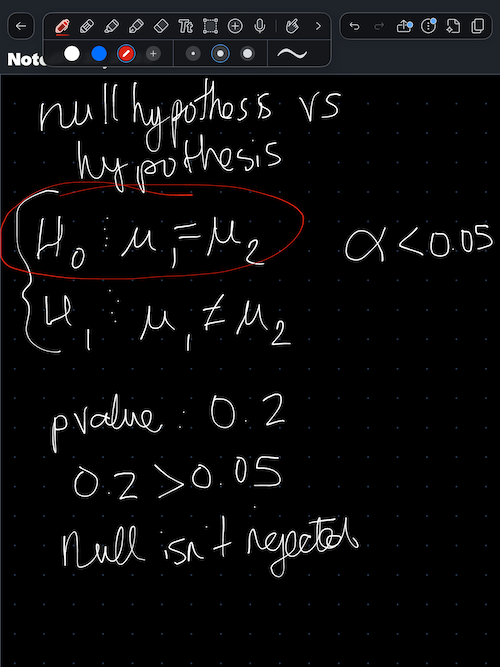
Image: Jessica Santero | WhistleOut
A toolbar with washi tape and a laser pointer
The top toolbar covers the pen and pencil basics, then adds a laser pointer for showing a classmate something on your screen and washi tape for decorating your pages. As an artistic notetaker, I found the washi tape a lot more fun than I expected. Notability even includes a Brain Break slider puzzle for study breaks, though you only get one new puzzle each day.
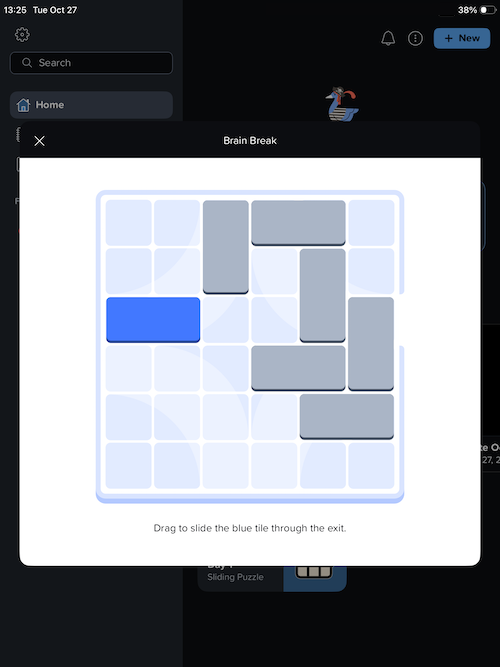
Image: Jessica Santero | WhistleOut
Not sure how to update your apps?
Keeping your apps up to date ensures you're always getting the latest features, bug fixes, and security improvements. Learn how to update the apps on your iPhone and your Android. It takes less time than you think.
Is Notability reliable enough to pay for?
Notability is great for students who change note formats constantly and like decorating their pages, but I can't call it fully reliable while the AI transcription stays broken for me. Start with the free version, test the recording feature on a real lecture, and upgrade only if it works for you.
The AI transcription was a bust in my testing
I spent an hour troubleshooting the record, transcribe, and summarize feature and never got it to work. I uninstalled and reinstalled the app, confirmed my Wi-Fi connection, and checked my cloud settings, and everything looked fine. The recording still wouldn't turn into a transcript or flashcards, so I deemed it bugged.
A broken headline feature is a bigger problem than a missing one, because it's the reason many students pay for the upgrade. Your experience may differ after an update, which is exactly why the free version comes first.
Who should still download it
Students who already record lectures with a separate app lose less if the AI feature fails, since the handwriting and paper tools work well on their own. Notability is also on Android, so it fits students who split their time between an iPad and an Android phone.
 How I tested Notability
- Switched paper styles during statistics coursework to test the on-screen quick settings against Goodnotes.
- Tried every tool in the top toolbar, including the laser pointer, washi tape, and Brain Break puzzle.
- Spent an hour troubleshooting AI transcription by reinstalling the app and checking Wi-Fi and cloud settings.
Notability: FAQ
Is Notability good for students?
Yes, Notability is good for students because you can switch between grid, lined, and blank paper right on the screen. Its AI transcription didn't work in my testing, though.
Is Notability free?
Notability has a free version, and paid plans are available as a yearly subscription or a one-time purchase. Current pricing is listed on the App Store and Google Play pages.
Can Notability record lectures?
Yes, Notability can record audio while you take notes and use AI to transcribe and summarize the recording.
Is Notability better than Goodnotes?
Notability is better for switching paper styles on the fly, but Goodnotes is the more reliable all-around note-taking app.
Does Notability work on Android?
Yes, Notability is available on Android as well as iPhone and iPad.
Why you can trust WhistleOut
.svg)
15+
years of mobile industry experience

900+
published wireless guides

35+
firsthand carrier reviews
We've been around since the birth of the iPhone. Along the way, we've learned how to spot the best deals for your wallet (and your sanity). We spend our days researching informative guides and writing insightful reviews on every kind of wireless plan, distinguishing what matters from what doesn't. We played around with these plans before recommending them, ensuring they're worth your hard-earned money.
Want to know more? Check out how we review every cell phone plan we rank.
Jessica Santero
Staff Writer

Thousands of cell phone plans unpacked. All the facts. No surprises.

Related Articles


Related Topics
App Reviews FeaturedPopular Topics
Featured App Reviews iOS News Coverage Device Reviews Device Explainers Carrier Explainers App Roundups T-Mobile


