
Freeform is Apple's free whiteboard app for iPhone and iPad, with boards for sticky notes, sheets, pens, and handwriting to text. It's the best free option in our roundup of the best note-taking apps for iPad, and I tested it on my iPad alongside six other note-taking apps.
Before you spend a cent on a note-taking app, check your iPad, because Freeform is probably already installed. It works well for jotting things down, but I wouldn't build a semester of notes around it.
- Free, with extra features through Apple Creator Studio
- Boards, sticky notes, sheets, and handwriting to text
- Available for iPhone and iPad
What is Freeform?
Apple Creator Studio, Apple's subscription bundle for its creative apps, adds premium features to Freeform and offers student and teacher discounts, but the free version is a complete app on its own. Freeform also syncs through iCloud, so a board you start on your iPhone is ready on your iPad. Handwriting to text cleans up quick scribbles so they're easier to read later.
Free app, cheaper plan: Verizon's network for less
If you're choosing Freeform to save money, your phone bill is the next place to look. Verizon MVNOs give you the same Verizon coverage you'd get from the major carrier, often for about half the price, and you can usually keep your number when you switch.
Check out the most popular Verizon MVNO plans right now:


A minimal canvas that stays out of your way
Freeform's interface is just your board and a few small toolbars that pop up only when you select a tool. That minimalism keeps the page front and center while you write. The quill tool was my favorite of the bunch, though one great pen isn't enough reason to choose a note-taking app.
Sharing works like any other Apple app
You can send a board to classmates or coworkers right from the app, which makes it handy for group brainstorms between Apple users. Shared boards stay editable, so everyone in the group can add sticky notes to the same brainstorm.
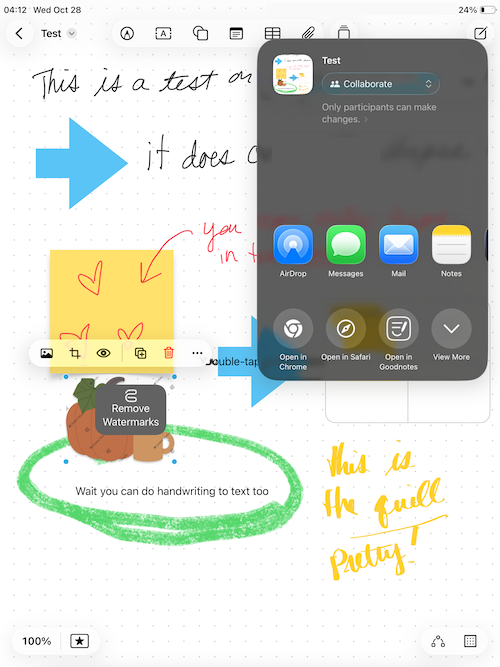
Image: Jessica Santero | WhistleOut
Not sure how to update your apps?
Keeping your apps up to date ensures you're always getting the latest features, bug fixes, and security improvements. Learn how to update the apps on your iPhone and your Android. It takes less time than you think.
Can Freeform replace a paid notes app?
Freeform is perfect for quick notes when you don't have a notebook on hand, and visual thinkers can use it to replace Apple's Notes app entirely. Its open board lets sticky notes, sheets, and handwriting sit wherever you place them, which suits visual thinkers better than a scrolling page of text. It also works for iPhone owners who need to take notes without a notebook, or iPad owners who just need to jot something down. If you need structured notebooks, templates, or images without watermarks, a dedicated app like Goodnotes is worth the upgrade.
Boards only, no notebooks
Freeform doesn't support notebooks, so every set of notes lives on a separate board. That's fine for a single meeting or study session, but organizing a full course across dozens of boards gets messy quickly.
Watermarks get in the way of your images
In my testing, every image I added carried a watermark unless I paid for the subscription. A watermark across a diagram or slide screenshot is distracting, and it defeats the purpose of adding images to your notes at all. Students and teachers can look into Apple Creator Studio discounts, but paying for a subscription removes Freeform's biggest advantage over the competition.
 How I tested Freeform
- Took notes on boards with every pen and tool, including the quill tool, sticky notes, and handwriting to text.
- Shared a board from the app to see how easily other Apple users can open it.
- Added images without a subscription to check what the free version watermarks.
Freeform: FAQ
What is the best free note-taking app for iPad?
Freeform is the best free note-taking app for iPad. It's Apple's free whiteboard app with sticky notes, sheets, different pens, and handwriting to text.
Is Freeform free?
Yes, Freeform is free, and Apple Creator Studio adds premium features for subscribers.
Can you make notebooks in Freeform?
No, Freeform only supports boards, so you can't group pages into a notebook.
Why do my Freeform images have watermarks?
In my testing, images added to Freeform boards had watermarks unless I subscribed to Apple Creator Studio.
Is Freeform available on Android?
No, Freeform is an Apple app available on iPhone and iPad.
Why you can trust WhistleOut
.svg)
15+
years of mobile industry experience

900+
published wireless guides

35+
firsthand carrier reviews
We've been around since the birth of the iPhone. Along the way, we've learned how to spot the best deals for your wallet (and your sanity). We spend our days researching informative guides and writing insightful reviews on every kind of wireless plan, distinguishing what matters from what doesn't. We played around with these plans before recommending them, ensuring they're worth your hard-earned money.
Want to know more? Check out how we review every cell phone plan we rank.
Jessica Santero
Staff Writer

Thousands of cell phone plans unpacked. All the facts. No surprises.

Related Articles


Related Topics
App Reviews FeaturedPopular Topics
Featured App Reviews iOS News Coverage Device Reviews Device Explainers Carrier Explainers App Roundups T-Mobile


