
Plex and Kanopy are both free streaming apps, but they are completely different. Plex is a live-TV and search platform if you want more niche titles, while Kanopy is a free streaming platform you can access at your local library. However, your Kanopy selection depends wholly on your library's educational offerings.
I tested both apps to see what each app was like, and they are so different you might as well download both. Plex is built for people who want an app similar to a TV guide, with zero setup. Kanopy is best for people who don't mind exploring new film genres.
We recommend: Download both, why not?
Plex and Kanopy are so different that you can use both for a better entertainment experience. Keep Plex around for live channels, sports, and quick scanning. Pull up Kanopy on the nights you want a film with zero ads. Together, you can get the best streaming experience possible—and for free.
Quick comparison
Plex:
- Live TV guide organized like real cable
- Doubles as an aggregator, pointing you to where else a title streams
- Ad breaks are static poster cards, not video commercials
- Works on almost any device, including smart TVs and desktops
- Ads can be bothersome
- No downloading movies or shows
Kanopy:
- Completely ad-free
- Titles include Oscar winners, foreign films, and documentaries
- 72-hour viewing window with unlimited replays
- Setup takes two minutes with a library card
- Requires an active library card from a participating branch
- Monthly rental limit (typically 5–25)
What each app offers, and how they're different
Plex offers three services in one free app: a live TV guide, an on-demand library, and a media aggregator. You can turn it on for live channels organized by category (such as HIT TV, Drama, Movies, News, Sports, Reality, Comedy, Game Shows), or browse for something on-demand. You can also search for specific titles, and Plex will tell you which platforms offer it (in case you have a subscription) or where you can rent it. I wish other services had this feature instead of simply offering me similar titles to the one I searched for (I'm looking at you, Netflix).
Kanopy is a free streaming service provided by your local library. It's a lot more limited than Plex, but you don't have to sit through ads. Since it's funded through library licensing agreements, it's completely free as long as you have a library card. Once linked, you can access the extensive catalog of curated films free of charge.
Both of these apps are compatible, but if you want a more TV-like experience, Plex is the winner. Otherwise, Kanopy is a solid choice for free movies.
Switch to unlimited data and stop rationing your streaming
Bouncing between a live guide, an on-demand library, and a curated film catalog adds up fast if you're not on Wi-Fi. You don't need a major-carrier price tag to get solid coverage.
Compare some of the most popular unlimited data plans right now:
|
Visible

$25 Visible Plan
$25.00/mo
Taxes & Fees included
|
|
Mint Mobile

Unlimited Data Plan
$10.00/mo
$60 for 6 months of service
|
|
Verizon

Simplicity Plan
$30.00/mo
+ Taxes & Fees. Price includes AutoPay & Bring a Number discount
|
Content library: Quantity versus quality
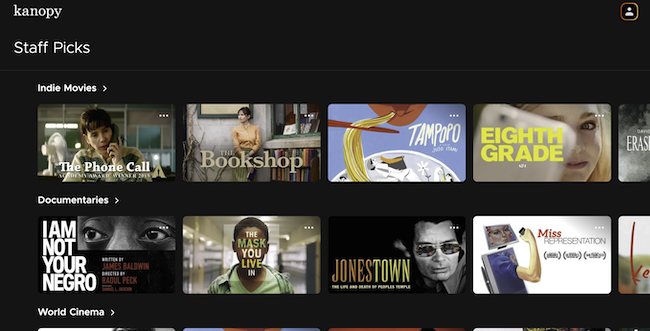
Image: Jessica Santero | WhistleOut
Kanopy's catalog is full of independent films, foreign cinema, classic Hollywood hits, and documentaries. Oscar nominees and winners show up on a regular basis, including titles you'd normally have to rent elsewhere. I always like to catch up on the films that win awards, but can never get my hands on them.
In a nutshell, Kanopy is your library's built-in streaming service with Staff Picks that are better than any recommended picks I've seen on Netflix.
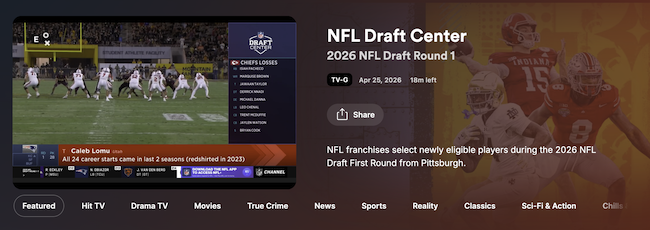
Image: Jessica Santero | WhistleOut
Plex's library offers more variety and a browsing experience like channel flipping. Between the on-demand titles and the live channel guide, it's easier to stumble onto something by accident than to search for it directly.
I sat through (and actually enjoyed) a full hour of NFL Draft coverage and detoured into Teen Wolf happily and completely by accident. That's the main difference between these two apps: Plex has great browsing, while Kanopy lets you choose among top films.
Ad experience: One has none, the other has few
Kanopy has no ads whatsoever. But in exchange for no ads, you have a limit on how many free rentals you get each month. Kanopy works on a ticket system, where you get anywhere between 5–25 rentals each month. Once you use a ticket to check out a film, you can watch it as many times as you want in 72 hours. It's extremely manageable, and that way the best movies aren't always checked out.
Plex does have ads, but instead of regular commercials, you get static poster cards with a countdown timer. There's no audio and no video, just a pause you can use to grab a snack before playback picks back up. It isn't as bothersome as most free, ad-supported apps, even if it isn't the zero-ad experience Kanopy offers.
Getting access: Download and go versus library linking
Plex doesn't require anything to start watching. All you have to do is download the app and tap to open. You don't even need an account to access the live guide and on-demand library right away.
However, Kanopy does require some setup. You need to link your library, which means inputting your library barcode. It only takes a few minutes to get ready if you already have a library card, but if you don't, then you'll need to make a stop at your local branch and ask for one.
To set up Kanopy, download the app, search for your library by name or zip code, and enter your library card number (student IDs work too, for university affiliates). A verification code arrives by text, and you're browsing the catalog within about two minutes.
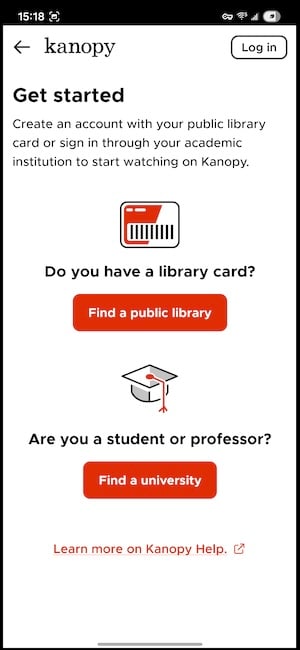
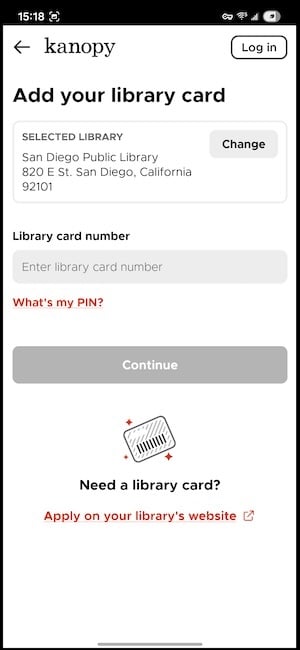
Image: Jessica Santero | WhistleOut
Not every library participates in Kanopy, so I recommend calling your branch to check and see. If it doesn't, Kanopy has no paid workaround—access depends entirely on where you live and which branch you're registered with.
A better camera makes scanning that library card painless
Kanopy's sign-up leans on your phone's camera to scan a library card and confirm a text verification code. If your current phone struggles with barcodes in low light, that two-minute setup can turn into ten.
Check out some of the best phone deals available right now:
Galaxy A26 5G
- 6.7 inch display
- Rear Cameras: 50MP, 8MP, 2MP
- Front Camera: 13MP

Galaxy A27 5G 128GB
- 6.7 inch display
- Rear Cameras: 50MP, 5MP, 2MP
- Front Camera: 12MP

Galaxy A37 5G 128GB
- 6.7 inch display
- Rear Cameras: 50MP, 8MP, 5MP
- Front Camera: 12MP


Which app uses less data?
| App | Data per 2-hour movie | Quality control |
|---|---|---|
| Plex | 1.4–6GB | Manual (SD to 1080p) |
| Kanopy | 3–4GB | Auto-adjusts (up to 1080p) |
Plex gives you more control over the data you use while streaming by allowing you to manually drop the quality. Kanopy adjusts automatically based on your connection, which is convenient but leaves less room to intervene if you're trying to conserve data on a limited plan. Both apps keep video loading in the background once a title starts, so if you're streaming over cellular instead of Wi-Fi, keep an eye on your usage.
Streaming for the whole household—for less
Running Plex on one device and Kanopy on another (or both on the same one) adds up quickly if more than one person in your household is streaming.
Compare the most popular unlimited family plans below:
|
Verizon
Simplicity Plan
$120.00/mo
+ Taxes & Fees. Price includes AutoPay & Bring a Number discount
|
|
T-Mobile

Essentials Saver 2.0
$100.00/mo
with Auto-Pay - Taxes & Fees NOT included
|
|
Spectrum Mobile®

Unlimited Plus
$160.00/mo
+ $80 Upfront
|
Plex vs. Kanopy: Which one should you download?
If you want to turn something on without deciding much, Plex is the better fit. The live guide includes a wide range of categories, the aggregator saves you from opening five apps to track down one title, and it works on almost any device you own.
Kanopy is the stronger pick for viewers who want to watch a movie without any ads. The catalog includes popular films and more indie choices as well, and the ticket system is more than enough for most viewers.
I say you download both. There's little reason to choose only one. They are completely different, but absolutely compatible for the best entertainment experience.
 How I tested Plex and Kanopy
I tested both apps on mobile and desktop, which included:
- Browsing Plex's live TV guide, on-demand library, and aggregator function
- Timing and evaluating Plex's ad format across different content types
- Linking a library card to Kanopy and confirming the ticket and 72-hour rewatch system
Pricing, features, and availability may have changed since this was written, but I'll try my best to keep it updated.
Why you can trust WhistleOut
.svg)
15+
years of mobile industry experience

900+
published wireless guides

35+
firsthand carrier reviews
We've been around since the birth of the iPhone. Along the way, we've learned how to spot the best deals for your wallet (and your sanity). We spend our days researching informative guides and writing insightful reviews on every kind of wireless plan, distinguishing what matters from what doesn't. We played around with these plans before recommending them, ensuring they're worth your hard-earned money.
Want to know more? Check out how we review every cell phone plan we rank.
Plex and Kanopy: FAQ
Is Plex or Kanopy better?
Neither app is better overall because they solve different problems. Plex is better for live TV, sports, and browsing without a plan. Kanopy is better if you want a specific film with zero ads and don't mind a library card and a monthly ticket limit.
Do I need a library card to use Kanopy?
Yes, Kanopy is free, but access depends on having a library card (or student ID) from a participating branch. Not every library system is connected, so make sure to check with your local branch.
How many movies can I watch on Kanopy each month?
That depends on your library's ticket allowance, typically between 5–25 tickets a month. Each film costs one ticket to start, and you get 72 hours to rewatch it as many times as you'd like before the allowance resets.
Can I watch live TV on Kanopy?
No, Kanopy is strictly an on-demand film library with no live channel guide. If you want live TV alongside on-demand streaming, Plex covers both in one app.
Jessica Santero
Staff Writer

Thousands of cell phone plans unpacked. All the facts. No surprises.


