
Paprika is a recipe manager that pulls recipes from almost any website through its built-in browser. It made our roundup of the best recipe apps for iPhone and Android as the most affordable pick, and it's the app I recommend to anyone who's tired of stacking up subscriptions.
Most recipe apps want a monthly subscription, but Paprika asks for a single one-time purchase and includes cloud sync between your devices at no extra cost. That one purchase gets you a built-in recipe browser, automatic cooking timers, and a grocery list that sorts itself by aisle.
Skip the overpriced phone bill this holiday season
If you chose Paprika to avoid paying monthly for something you can buy once, your phone plan deserves the same scrutiny. T-Mobile MVNOs run on T-Mobile's network and often cost a fraction of T-Mobile's own plans, although your data may be deprioritized during busy times.
Compare the most popular T-Mobile MVNO plans and see how much you could save:
|
Mint Mobile

Unlimited Data Plan
$10.00/mo
$60 for 6 months of service
|
|
Straight Talk

Platinum Unlimited Data Plan
$60.00/mo
+ $4.88 Upfront
|
|
Tello

Unlimited Text, Talk, and Data Plan
$25.00/mo
|

- $4.99 as a one-time purchase on mobile
- Free cloud sync between devices
- Available for iPhone and Android, with desktop versions for Mac and Windows
What is Paprika?
Paprika runs on iPhone and Android, with desktop versions for Mac and Windows, and your recipes sync between devices for free. The app also scales serving sizes, converts measurements, builds aisle-sorted grocery lists, and saves meal plans as reusable menus. Every mobile feature I tested came with the single purchase, with nothing locked behind a monthly plan.
Not sure how to update your apps?
Keeping your apps up to date ensures you're always getting the latest features, bug fixes, and security improvements. Learn how to update the apps on your iPhone and your Android. It takes less time than you think.
The built-in browser skips the ads and life stories
Paprika's browser comes preloaded with links to popular cooking websites, which sets it apart from other recipe import apps. Open the link list, tap your favorite site, find a recipe, and tap download, and the recipe goes straight into your recipe book. I tapped Food & Wine, browsed its pages without leaving the app, and saved recipes without copying a single link, which also spared me from typing URLs on a tiny keyboard.
Imported recipes leave behind the ads and the blogger's backstory, so you're left with ingredients and directions you can actually cook from. If your favorite site isn't on the preloaded list, the browser still lets you navigate to it and import from there.

Images: Jessica Santero | WhistleOut
Timers start straight from your recipe directions
Paprika detects cook times in your directions and turns them into timers you tap to start, so “roast for 45 minutes” becomes a running countdown on your phone. You can run multiple timers at once and pin several active recipes, which makes jumping between a side dish and a sauce far less chaotic. Pinned recipes stay one tap away, so checking the sauce won't make you lose your place in the side dish.
The ingredient scaler adjusts serving sizes and converts measurements, and the grocery list combines ingredients across recipes before sorting them by aisle. Saved menus might be the most underrated feature, because a dinner party lineup you plan this year is ready to reuse next year without rebuilding it.
Roundup articles confuse the importer
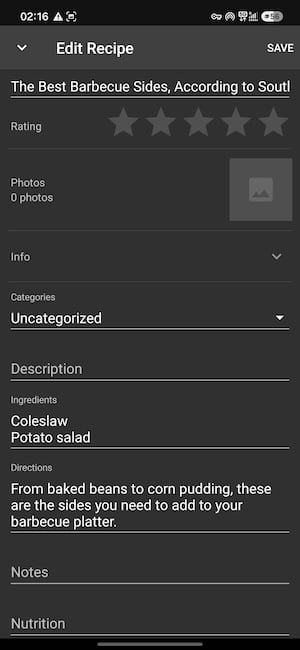
Paprika struggled with articles that contain more than one recipe. I tried importing an article titled “The Best Barbecue Sides, According to Southern Chefs,” and the app couldn't tell it held several recipes. The ingredient list read only coleslaw and potato salad, while the directions mentioned everything from baked beans to corn pudding. Following that import would leave you shopping for two dishes while reading directions for four.
The workaround is simple: Import single-recipe pages and skip roundups, or clean up a messy import with the edit tool afterward.
Is Paprika worth downloading?
Paprika is the best value on my list if you want a capable recipe manager without another monthly bill. Cooks who rely on roundup articles or social media videos will hit its limits, but anyone who saves single recipes from big cooking sites will get plenty of use from one purchase. Free cloud sync means a recipe you save on your phone is waiting on your tablet or computer the next time you cook. Current pricing is listed on the App Store and Google Play pages.
 How I tested Paprika
- Imported recipes through the built-in browser on Android using its preloaded cooking site links, including a multi-recipe roundup article.
- Tested the cooking tools including the tap-to-start timers, ingredient scaler, and aisle-sorted grocery list.
- Weighed affordability by comparing the one-time purchase against the subscription pricing of other recipe apps.
Why you can trust WhistleOut
.svg)
15+
years of mobile industry experience

900+
published wireless guides

35+
firsthand carrier reviews
We've been around since the birth of the iPhone. Along the way, we've learned how to spot the best deals for your wallet (and your sanity). We spend our days researching informative guides and writing insightful reviews on every kind of wireless plan, distinguishing what matters from what doesn't. We played around with these plans before recommending them, ensuring they're worth your hard-earned money.
Want to know more? Check out how we review every cell phone plan we rank.
Paprika: FAQ
Is Paprika a one-time purchase?
Yes, Paprika is a one-time purchase on iPhone and Android, and cloud sync between devices is included for free.
Can Paprika import recipes from any website?
Paprika imports recipes from almost any website through its built-in browser, but it struggles with articles that contain multiple recipes.
Does Paprika have cooking timers?
Yes, Paprika detects cook times in your recipe directions and turns them into timers you tap to start, and you can run several at once.
Does Paprika work on Windows and Mac?
Yes, Paprika has desktop versions for Mac and Windows in addition to its iPhone and Android apps.
What is the best recipe app without a subscription?
Paprika is my top pick for a recipe app without a subscription because its one-time purchase includes web imports, timers, grocery lists, and free cloud sync.
Jessica Santero
Staff Writer

Thousands of cell phone plans unpacked. All the facts. No surprises.


