
ReciMe is a recipe organizer and meal planner that imports recipes from social media posts, food blogs, and photos of printed recipes. It's my personal favorite from our roundup of the best recipe apps for iPhone and Android, and WhistleOut Android expert Scott Houghton spent a month testing it on real recipe videos to see whether the imports hold up in an actual kitchen.
My Instagram saved folder holds dozens of recipe reels I fully intended to cook and never did. ReciMe turns those videos into complete, editable recipes with ingredient lists and steps, then builds your grocery list from them.
Recipe reels burn through data faster than you think
Every TikTok and Instagram recipe video you watch before sharing it to ReciMe streams over your connection, and a scrolling session in the grocery store parking lot can drain a capped plan. An unlimited data plan keeps the reels loading and your Instacart list syncing wherever you are.
Check out the best unlimited data plans available right now:
|
Visible

$25 Visible Plan
$25.00/mo
Taxes & Fees included
|
|
Mint Mobile

Unlimited Data Plan
$10.00/mo
$60 for 6 months of service
|
|
Verizon

Simplicity Plan
$30.00/mo
+ Taxes & Fees. Price includes AutoPay & Bring a Number discount
|

- Free for up to five recipes
- Premium removes the limit for $4.99/month
- Available for iPhone (iOS 17 or later) and Android (Android 12 or later)
What is ReciMe?
ReciMe lets you edit any recipe to add your own touch, sort recipes into custom cookbooks, and print them or save them as PDFs. Custom cookbooks keep everything tidy, so weeknight dinners, baking projects, and party food can each live in their own collection instead of one endless list. ReciMe only runs on iPhones with iOS 17 or later and Android phones with Android 12 or later, so check your software version before you download it on an older device.
Not sure how to update your apps?
Keeping your apps up to date ensures you're always getting the latest features, bug fixes, and security improvements. Learn how to update the apps on your iPhone and your Android. It takes less time than you think.
Social media imports are impressively accurate
Share an Instagram or TikTok recipe video to ReciMe, and the app generates the full ingredient list and step-by-step directions in seconds. Scott tried the feature on dozens of recipe videos over a month, and it nailed the vast majority of them.
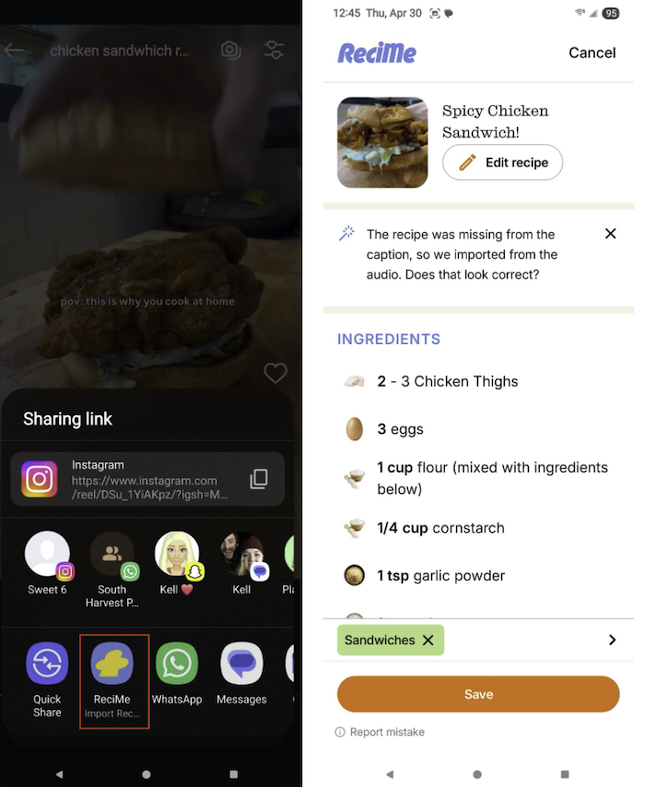
Image: Scott Houghton | WhistleOut
Some reels are harder for any app to import because the creator shows the recipe only in the video and leaves it out of the caption. In those cases, ReciMe still gets you about 90% of the way there, and the edit tool lets you fill in a missing measurement or step yourself, which still beats pausing a reel every few seconds to jot down measurements.
The meal planner does the tedious shopping math
ReciMe's meal planner lets you assign saved recipes to specific days, so you can see a full week of dinners at a glance before you shop. The app then turns that plan into a grocery list sorted by aisle, with duplicate ingredients combined across recipes. Two recipes that each call for sugar produce one line on your list, so you won't backtrack to the baking aisle.
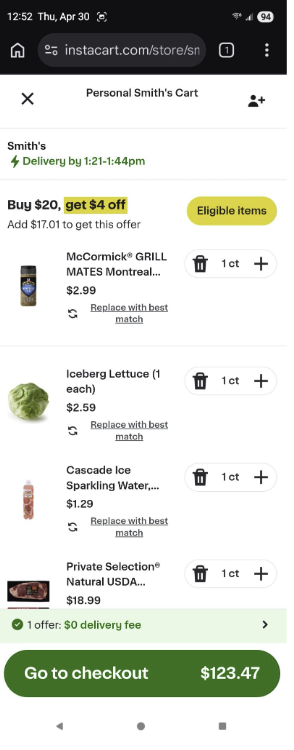
Image: Scott Houghton | WhistleOut
One tap sends the whole list to Instacart for pickup or delivery, which takes the last bit of friction out of meal planning. ReciMe also lets me keep the maple bacon biscuits I saved from Instagram next to a photo import of my grandma's handwritten divinity recipe, then shop for both from a single list.
Is ReciMe worth downloading?
ReciMe is worth paying for if your recipe inspiration comes from TikTok and Instagram rather than cookbooks. If you mostly cook from food blogs and only need a handful of saved recipes, a web-focused app like Recipe Keeper may be all you need.
The free tier works more like a demo
The free version limits you to five recipes, which is barely enough to test the import feature. Scott recommends starting with the monthly Premium plan before committing to a full year, so you can confirm the imports work with the creators you follow. Current pricing for both plans is on the App Store and Google Play pages.
Scott also recommends printing the recipes you gather in ReciMe, because waking your phone with your nose while your hands are covered in raw chicken juice gets old quickly. ReciMe's print and PDF options make it easy to keep a paper copy on the counter while your phone stays clean.
 How we tested ReciMe
- Shared dozens of Instagram and TikTok recipe videos to ReciMe over a month of testing by Scott Houghton, checking how accurately the app generated full ingredient lists and steps.
- Built a weekly meal plan by assigning recipes to specific days to see how quickly a full week came together.
- Tested the grocery list to confirm it sorted by aisle, combined duplicate ingredients, and sent correctly to Instacart.
ReciMe: FAQ
Can ReciMe import recipes from TikTok and Instagram?
Yes, share a recipe video from TikTok or Instagram to ReciMe, and the app generates the full ingredient list and steps. Accuracy drops when the recipe appears only in the video and not in the caption.
Is ReciMe free?
ReciMe has a free tier, but it limits you to five recipes. The Premium plan removes the limit.
Does ReciMe work with Instacart?
Yes, ReciMe sends your aisle-sorted grocery list to Instacart with one tap for pickup or delivery.
What phones does ReciMe work on?
ReciMe works on iPhones running iOS 17 or later and Android phones running Android 12 or later.
What is the best app for saving recipes from social media?
ReciMe is my top pick for saving recipes from social media because it turns TikTok and Instagram videos into full, editable recipes.
Why you can trust WhistleOut
.svg)
15+
years of mobile industry experience

900+
published wireless guides

35+
firsthand carrier reviews
We've been around since the birth of the iPhone. Along the way, we've learned how to spot the best deals for your wallet (and your sanity). We spend our days researching informative guides and writing insightful reviews on every kind of wireless plan, distinguishing what matters from what doesn't. We played around with these plans before recommending them, ensuring they're worth your hard-earned money.
Want to know more? Check out how we review every cell phone plan we rank.
Jessica Santero
Staff Writer

Thousands of cell phone plans unpacked. All the facts. No surprises.


