
Recording audio on Android takes three taps: Open the Recorder app, tap the red button to start recording, then tap Stop when you’re done.
For years, most people have left the app unused. And for good reason. For a long time, the stock Android recorder was essentially just a stopwatch with a save button.
But in 2026, that's no longer true. That no-frills voice recorder grew up into a full transcription service that writes out every word as you say it, sorts out who said what, and hands you a summary when it's done.
Let’s walk through the steps to use your Android Recording app.
Find the voice recorder app on your phone
The voice recorder is called Recorder on Pixel phones and Voice Recorder on Samsung Galaxy phones. Both come preinstalled, and neither one puts an icon on your home screen by default, which is why most people assume their phone doesn't have one.
On a Pixel: App drawer > Recorder
On a Galaxy: App drawer > Samsung folder > Voice Recorder
If neither path turns it up, open the app drawer and type "record" in the search bar. Samsung moves Voice Recorder around depending on your One UI version, so it isn't always in the Samsung folder. Both apps are free downloads if they've been uninstalled, and Samsung's is in the Galaxy Store and the Google Play Store.
How to record a voice memo on Android
For a basic recording, the app offers some straightforward options:
- If you only want to record continuous audio, you’ll tap the red button to start recording and use the Stop button to end it.
- If you want to selectively record multiple moments in one file, start the recording with the red button, tap the pause button to keep from recording any more until you tap the button again to unpause. Finally, use the Stop button to end the recording. The Recorder app will then compile each moment you recorded into one file for you.
Once you stop recording, your Android device then asks you to name the file, and Samsung devices also ask for a category choice so recordings don't pile up in one endless list.
You can even get more specific in your recording types with modes on Galaxy devices. Samsung offers two recording modes you can swap between for the best audio:
- Standard mode blends both feeds from your device’s microphones into one balanced file, which is what you want for meetings and lectures.
- Interview mode records the top and bottom mics separately and filters out everything else (like background noise), so each person gets their own waveform in the file.
Finally, the Bookmarks feature lets you mark a moment while the recording is still running. Tap the bookmark icon whenever something important gets said, and you'll have a marker you can jump straight back to instead of scrubbing through 40 minutes of audio to find the 30 seconds you needed.
Turn your recording into text
You can also easily convert any recording into a transcript of text to work with. Pixel and Galaxy phones both convert recordings to text without a third-party app, but they do it differently.
Transcribe a recording on a Pixel phone
Google's Recorder transcribes as you speak, so the text is finished the moment you tap Stop. It tags each voice as Speaker 1 and Speaker 2 with a limit of 10 different voices.
Transcribe a recording on a Galaxy phone
Samsung handles transcription through Transcript Assist, which runs after the fact rather than live. Open a saved recording, tap Transcribe, pick the language, and your device gives you a transcript alongside a Summary tab.
Where your recordings are saved
Android devices save recordings as .m4a files in internal storage, but where you find them depends on your phone.
Saved recordings on a Pixel phone
Recordings land in a Recordings folder in internal storage, which you can reach through the Files app.
- Anything you've recorded also shows up at recorder.google.com, which is usually faster than hunting for the file itself.
Saved recordings on a Galaxy phone
Samsung buries recordings in Internal storage > Android > Data > Files.
- That's a long path through My Files folders, so searching the recording's name in the My Files search bar gets you there faster.
Internal memory full?
An hour of compressed voice audio runs a few dozen megabytes, which means a handful of memos costs you very little in storage. But record every lecture for a semester and that math changes—and a 128GB phone starts feeling small in a hurry.
If you want a phone with more room to work with, our roundup of the best back-to-school cell phone deals is the place to start shopping.
Looking for the newest Android phone? Here are some of our favorites:
Galaxy A26 5G
- 6.7 inch display
- Rear Cameras: 50MP, 8MP, 2MP
- Front Camera: 13MP
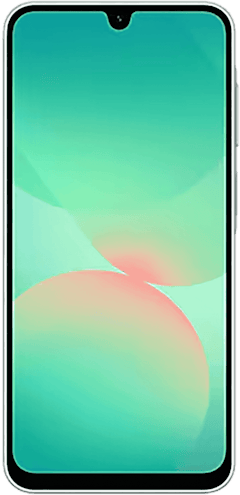
Galaxy A27 5G 128GB
- 6.7 inch display
- Rear Cameras: 50MP, 5MP, 2MP
- Front Camera: 12MP
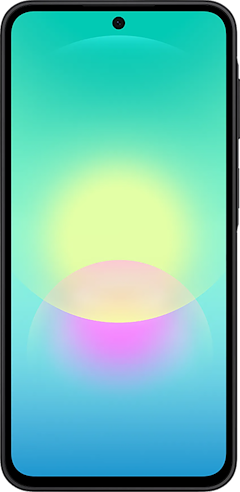
Galaxy A37 5G 128GB
- 6.7 inch display
- Rear Cameras: 50MP, 8MP, 5MP
- Front Camera: 12MP

Galaxy A57 5G 128GB
- 6.7 inch display
- Rear Cameras: 50MP, 12MP, 5MP
- Front Camera: 12MP
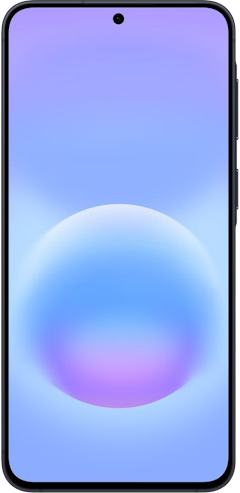
Pixel 10a 128GB
- 6.3 inch display
- Rear Cameras: 48MP, 13MP
- Front Camera: 13MP


Android Voice Recorder: FAQ
Does every Android phone have a voice recorder app?
Most Android phones ship with a recorder preinstalled, but the app differs by brand. Google's Recorder is Pixel-only, so phones outside the Pixel and Galaxy lineups need a Play Store app like Easy Voice Recorder.
Can I record a phone call with the Android voice recorder?
The voice recorder app can't capture phone calls on Pixel or Galaxy phones. Android has blocked apps from the call audio stream since Android 10, and about a dozen states require everyone on the call to consent before you record at all.
How long can a single Android voice recording be?
Storage space is the only real limit on recording length. An hour of voice audio is a few dozen megabytes, so a phone with room to spare can hold days of it.
Do I need an internet connection to transcribe a recording?
Pixel's Recorder transcribes on the device, so it works in airplane mode. Samsung's Transcript Assist needs the language pack downloaded first, and the "Process data only on device" toggle in Galaxy AI settings keeps it local after that.
Will my phone keep recording if I switch apps or lock the screen?
Recording continues in the background on both Pixel and Galaxy phones. A notification with pause and stop controls stays in your shade until you end it.
How do I share a recording or its transcript?
Open the recording and tap Share to send the .m4a file anywhere. Pixel exports the transcript as separate text and gives you a link at recorder.google.com, and Samsung lets you copy the transcript text straight from Transcript Assist.
Can I get back a voice recording I deleted?
Deleted recordings land in a trash folder first. Galaxy phones hold them in My Files > Trash for 30 days, and Pixel keeps them in the Recorder app's trash, plus anything already backed up to your Google account.
Scott Houghton
Jr. Staff Writer

Thousands of cell phone plans unpacked. All the facts. No surprises.





.png?w=280&h=280&usm=20&usmrad=0.8&fit=crop "The Best Cheap Phone Plans for 2026: We Tested Them All to Help You Save")


