
Apple Maps and Waze are two of the most popular navigation apps on the road, but which one is best for most drivers? It's a question of picking between one of Apple's native apps or a third-party alternative.
Overall, we think Apple Maps is a solid daily driver with excellent CarPlay compatibility and privacy features. Plus, as Apple's built-in navigation app, it's easy to find and doesn't take up additional space on your device. However, Waze still stands out during a bad commute or long trip with its real-time, crowdsourced alerts for accidents, police, and hazards.
We put both apps through daily driving and long highway stretches to find out whether Apple's upgrades finally add up to a win over Waze, or whether that reporting network is still too far ahead to catch.
We recommend: Waze for heavy traffic, Apple Maps for everything else
Reach for Waze the moment you're commuting through real congestion or unfamiliar city driving. Its crowdsourced alerts for accidents, police, and hazards still catch problems before you're stuck in them, and no built-in app has matched that yet. Stick with Apple Maps for routine daily driving, offline trips, or anytime privacy matters to you. It's tightly wired into CarPlay and Siri, doesn't require an account, and doesn't sell your location data.
Quick comparison
Waze:
- Free on iOS and Android, no subscription tier
- Crowdsourced alerts for accidents, police, and hazards
- Automatic rerouting the moment traffic backs up
- Uses less mobile data than both Google Maps and Apple Maps
- 4.8-star rating across more than 3 million App Store reviews
- No offline maps; needs a live connection to work at all
- Requires opening a separate app instead of a phone default
Apple Maps:
- Preloaded on every iPhone, no download required
- Tightly integrated with Siri and CarPlay
- Offline map support for dead zones and rural driving
- Doesn't require a separate account
- Doesn't sell your location data
- No crowdsourced, real-time hazard or police alerts
- Uses more mobile data than Waze over equivalent routes
Waze offers real-time traffic alerts
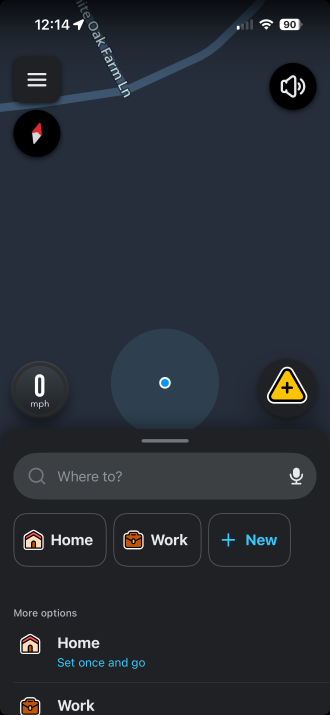
Image: Max McCaskill
Waze's most impressive feature relies on the massive network of millions of drivers using it right now. Every accident, stalled car, speed check, and pothole gets logged by someone who just passed it, and the app reroutes you automatically the instant it detects a slowdown on your path.
Apple Maps simply doesn't have an equivalent system. It handles turn-by-turn directions, transit routing, and general navigation well, but it isn't crowdsourcing live incident reports from a community of drivers the way Waze does. While Apple has closed other gaps over the years, like tightening its transit data and adding features like speed limit warnings, the live hazard reporting isn't one of them.
During Jessica's Waze testing, she also found that it generally uses less data than Apple Maps. That's important if you don't have an unlimited phone plan. However, Waze does sell some of your anonymized data, which matters if location privacy is a priority for you. Apple Maps doesn't sell your data at all, which makes it the easy pick for data privacy advocates.
Navigating all day burns through data fast
Running either app for a full commute, let alone a road trip, means your phone is pulling live map and traffic data for hours at a time. A plan with a healthy data allotment keeps things running smoothly so your navigation system doesn't stall out mid-drive.
Check out our guide to the best MVNOs and compare plans below:
|
Visible

$25 Visible Plan
$25.00/mo
Taxes & Fees included
|
|
Mint Mobile

Unlimited Data Plan
$10.00/mo
$60 for 6 months of service
|
|
Spectrum Mobile®

Unlimited Plus
$40.00/mo
+ $20 Upfront
|
Apple Maps offers privacy, offline maps, and CarPlay
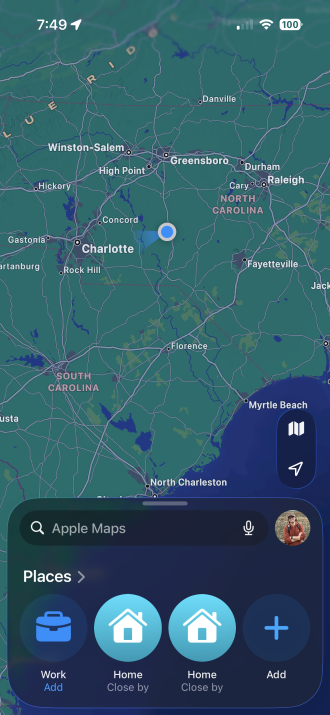
Image: Max McCaskill
Apple Maps comes preloaded on every iPhone, and it gives an excellent experience for general driving. It doesn't require a separate account, offers tight CarPlay support, has offline map capability, and it doesn't sell your location data the way most third-party map apps do. For daily driving and basic directions, it's a genuinely solid default.
Waze works with CarPlay too, but it requires extra steps to open the app whenever you start the car. Waze also has no offline mode, so a dead zone on a rural stretch of highway leaves it useless right when you might need it most. Apple Maps keeps working in that same scenario, since its maps are cached on your device ahead of time and you can download offline maps if you need them.
Personally, I rely on Apple Maps as my daily driver, even knowing Waze wins on live reports. Privacy is part of it, but so is the fact that I don't want a second navigation app sitting on my phone taking up storage space I could use for something else. That's a personal tradeoff, not a universal one, so weigh it against how often you're actually driving through the kind of traffic where Waze's alerts would save you real time.
Data usage: Waze is the lighter option
| App | Typical data draw | What drives usage |
|---|---|---|
| Waze | Lightest of the three major navigation apps we've tested | Live map tiles and crowdsourced traffic data pulled continuously while active |
| Apple Maps | Higher than Waze over equivalent routes | Live map rendering plus transit and points-of-interest data |
Our testing shows Waze pulls less mobile data than both Google Maps and Apple Maps over the same route, which matters once you're navigating for hours on a road trip instead of a quick errand.
A household full of drivers adds up fast
Between multiple people navigating to work, school, and everywhere in between, a family's combined data usage climbs faster than any one person notices. Compare the top family plans built to ensure that everyone in your family has enough data to get around:
|
Verizon

Simplicity Plan
$120.00/mo
+ Taxes & Fees. Price includes AutoPay & Bring a Number discount
|
|
T-Mobile

Essentials Saver 2.0
$100.00/mo
with Auto-Pay - Taxes & Fees NOT included
|
|
Spectrum Mobile®
Unlimited Plus
$160.00/mo
+ $80 Upfront
|
How to get each app running
Waze is a straightforward download on either app store, and it's free with no premium tier to upsell you on. Open it, allow location access, and you're routing within a minute or two.
Apple Maps doesn't need a download at all, since it's built into every iPhone. It's ready to use the moment you open it.


 How we tested Waze and Apple Maps
We tested both apps on an iPhone across daily commutes and longer highway drives, including:
- Running each app on unfamiliar routes and commutes to check rerouting speed and alert accuracy
- Comparing mobile data draw across equivalent trips
- Testing offline functionality by driving through areas with weak or no signal
- Checking CarPlay integration and account requirements for each app
Pricing, features, and availability may have changed since we wrote this, but we'll try our best to keep it updated.
Why you can trust WhistleOut
.svg)
15+
years of mobile industry experience

900+
published wireless guides

35+
firsthand carrier reviews
We've been around since the birth of the iPhone. Along the way, we've learned how to spot the best deals for your wallet (and your sanity). We spend our days researching informative guides and writing insightful reviews on every kind of wireless plan, distinguishing what matters from what doesn't. We played around with these plans before recommending them, ensuring they're worth your hard-earned money.
Want to know more? Check out how we review every cell phone plan we rank.
Waze and Apple Maps: FAQ
Does Apple Maps beat Waze?
No, Apple Maps does not beat Waze. Apple Maps has improved significantly and now offers a solid daily driving experience, but it still lacks Waze's crowdsourced, real-time alerts for accidents, police, and hazards. Waze remains the better pick for heavy traffic and unfamiliar routes.
Is Waze free?
Yes, Waze is completely free on iOS and Android with no subscription tier or paid upgrade.
Does Apple Maps work offline?
Yes. You can download offline maps on the Apple Maps app for a specific region ahead of time, which is useful for rural driving or areas with weak signal. Waze has no offline mode and requires a live connection to function.
Does Waze or Apple Maps use less data?
Based on our testing, Waze uses less mobile data than Apple Maps over equivalent routes, though downloading offline maps in Apple Maps using Wi-Fi ahead of a trip can narrow that gap.
Can I use Waze and Apple Maps at the same time?
Yes, you can use both Waze and Apple Maps at the same time, but only one app can show its visual map on your iPhone's display or CarPlay interface at once.
Max McCaskill
Sr. Staff Writer

Thousands of cell phone plans unpacked. All the facts. No surprises.


