
Reminders and Todoist are both task-management apps, but one is built into every iPhone for quick lists, and the other is a third-party alternative built for running full projects. Like most other Apple apps we've pitted against third-party rivals, Todoist fills in the gaps where Reminders falls short.
Reminders handles the basics well. Things like quick lists, due dates, and alerts are simple to create and tied directly into Siri and your Calendar. Todoist goes further, with sections, filters, and collaboration tools built for juggling several projects with other people at once.
We recommend: Reminders for quick tasks, Todoist for real projects
Stick with Reminders if you just need a quick reminder, like a grocery list, an upcoming event, or a note to call someone back. Switch to Todoist if you're managing recurring projects, want advanced filters, or need something that works the same on Windows and Android.
Quick comparison
Reminders:
- Built into every Apple device, no download required
- Tied directly into Siri and the Calendar app
- Simple lists with due dates, locations, and time-based alerts
- Completely free, no subscription of any kind
- Not built for complex projects with multiple moving parts
- No functionality on Windows and Android
- No advanced filters or gamified motivation features
Todoist:
- Works the same on iOS, Android, Windows, and the web
- Organizes projects into sections with advanced, combinable filters
- Karma system tracks streaks and levels to keep you motivated
- Collaborative lists for sharing projects with other people
- Downloaded more than 30 million times across the App Store and Google Play
- Free tier caps out at 5 active projects; Pro starts at $5/month
- Requires its own separate account and app download
Reminders is best for basic daily tasks
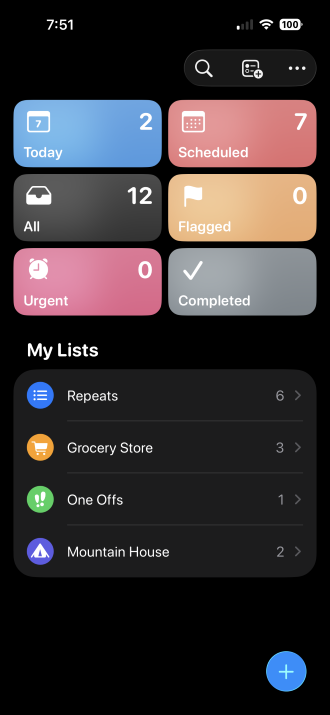
Image: Max McCaskill
Reminders is Apple's default to-do list app, and it's built for exactly what its name suggests: quick reminders. It's built into every Apple device, syncs automatically, and ties directly into Siri and the Calendar app. You can create simple lists and set due dates, locations, or time-based alerts for individual tasks without opening a second app or setting up an account.
That said, Reminders starts to strain once a task list turns into an actual project. There's no way to break a list into sections, no advanced filtering to combine multiple criteria at once, and nothing resembling a motivation system to keep you on track over weeks or months. Unfortunately, its usefulness outside the Apple ecosystem is also limited, since Windows and Android users can't access it.
Shared lists work best with a family plan behind them
Reminders lists sync instantly across everyone sharing an Apple ID group, which makes household to-do lists and grocery runs easier to split up.
Compare best family plans built for households staying in sync:
|
Verizon

Simplicity Plan
$120.00/mo
+ Taxes & Fees. Price includes AutoPay & Bring a Number discount
|
|
T-Mobile

Essentials Saver 2.0
$100.00/mo
with Auto-Pay - Taxes & Fees NOT included
|
|
Spectrum Mobile®

Unlimited Plus
$160.00/mo
+ $80 Upfront
|
Todoist is best for managing complex projects
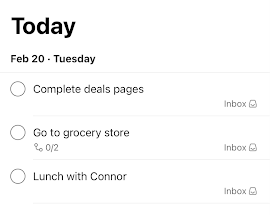
Image: Max McCaskill
Todoist is built for the kinds of scenarios where Reminders falls short, like planning that involves multiple moving parts or people. Projects break down into sections and filters combine several criteria at once. Priorities, due dates, and labels can be organized, and every task can be assigned to someone else on a shared project.
The app also adds a points-based motivation system called Karma. It tracks streaks and levels as you complete tasks, which turns an ordinary to-do list into something closer to a habit tracker. On top of that, it works identically whether your project partner is on Android, Windows, or iPhone, so nobody on a shared project gets a lesser experience.
These extras do come with a limit. The Todoist free tier caps out at 5 active projects, so anyone managing more than that will need to upgrade:
- Free: 5 active projects
- Pro: $5/month (billed annually) or $7/month, 300 projects, custom reminders, full activity history
- Business: $8/user/month (billed annually) or $10/user/month, adds a shared team workspace
Todoist is considered one of the best organization apps because of its productivity features, and it's been downloaded more than 30 million times across the Apple App Store and Google Play Store.
Collaborating on projects needs a plan that keeps up
Assigning tasks and syncing shared projects across a work team or a group project for school works best when everyone's connection can keep pace, especially when notifications and updates need to land instantly.
Check out our guide to the best MVNOs and compare plans below:
|
Visible

$25 Visible Plan
$25.00/mo
Taxes & Fees included
|
|
Mint Mobile

Unlimited Data Plan
$10.00/mo
$60 for 6 months of service
|
|
Spectrum Mobile®
Unlimited Plus
$40.00/mo
+ $20 Upfront
|
How to get each app running
Reminders doesn't need a download at all, since it's built into every Apple device. It's ready to use as soon as you open it.
Todoist is a straightforward download on either app store, with a free tier to get started. Install it, create an account, and you can start building your first project within a couple of minutes.

 How we tested Reminders and Todoist
We looked at both apps across everyday task management and multi-step project planning, including:
- Building simple lists and time-based alerts in Reminders across Apple devices
- Setting up a multi-section project with filters and collaborators in Todoist
- Confirming which claims about pricing, downloads, and feature limits still hold up
Pricing, features, and availability may have changed since we wrote this, but we'll try our best to keep it updated.
Why you can trust WhistleOut
.svg)
15+
years of mobile industry experience

900+
published wireless guides

35+
firsthand carrier reviews
We've been around since the birth of the iPhone. Along the way, we've learned how to spot the best deals for your wallet (and your sanity). We spend our days researching informative guides and writing insightful reviews on every kind of wireless plan, distinguishing what matters from what doesn't. We played around with these plans before recommending them, ensuring they're worth your hard-earned money.
Want to know more? Check out how we review every cell phone plan we rank.
Reminders and Todoist: FAQ
Is Apple Reminders or Todoist better for managing projects?
Todoist is the better choice for managing complex projects. It supports sections, advanced filters, and collaboration tools that Reminders doesn't offer.
Is Todoist free to use?
Todoist offers a free tier that supports up to 5 active projects. The Pro tier costs $60/year or $7/month, and raises that cap to 300 projects.
Does Apple Reminders work on Android or Windows?
Reminders does not run outside the Apple ecosystem. Android or Windows users must log in online through iCloud to view them. For cross-platform task management with Android or Windows users, Todoist is the better option.
Is Apple Reminders free to use?
Yes, Reminders is completely free and built into every Apple device, with no subscription required.
Can I share lists or projects with other people in Todoist?
Yes, Todoist supports project sharing with users on Apple, Android, and Windows devices.
Max McCaskill
Sr. Staff Writer

Thousands of cell phone plans unpacked. All the facts. No surprises.


