
Most subscription trackers ask for your bank login before they'll show you a single recurring charge. Bobby keeps your financial data safe because it doesn't need your bank access. It's a manual tracker built for people who want to see every subscription they're paying for without handing over financial account access to another app.
After testing it for a month, I'm thoroughly impressed by how far a simple approach can go. Bobby wasn't the only app I tested, though, so make sure to check out our roundup of the best subscription tracking apps.
Why you can trust WhistleOut
.svg)
15+
years of mobile industry experience

900+
published wireless guides

35+
firsthand carrier reviews
We've been around since the birth of the iPhone. Along the way, we've learned how to spot the best deals for your wallet (and your sanity). We spend our days researching informative guides and writing insightful reviews on every kind of wireless plan, distinguishing what matters from what doesn't. We played around with these plans before recommending them, ensuring they're worth your hard-earned money.
Want to know more? Check out how we review every cell phone plan we rank.
Cut a bigger recurring bill while you're at it
If you're auditing every subscription down to the dollar, your phone plan deserves the same scrutiny. Plans with international data can replace two or three separate travel subscriptions at once.




- Free
- Available for iPhone only
*Pricing reflects what Bobby listed at the time of testing. Check the App Store listing for current pricing.
What is Bobby?
Bobby is a manual subscription tracker that keeps a running list of every recurring charge you enter yourself. There's no bank connection, no automatic transaction scanning, and no monthly fee. You add each subscription with its cost, first payment date, and billing cycle, and Bobby keeps a visual record so nothing slips through the cracks.
Setting up your subscription tiles takes minutes
Each subscription becomes a movable icon tile you can drag and rearrange on the main screen. Bobby's built-in company library covers nearly every major subscription service, so adding Netflix or Spotify takes a couple of taps.
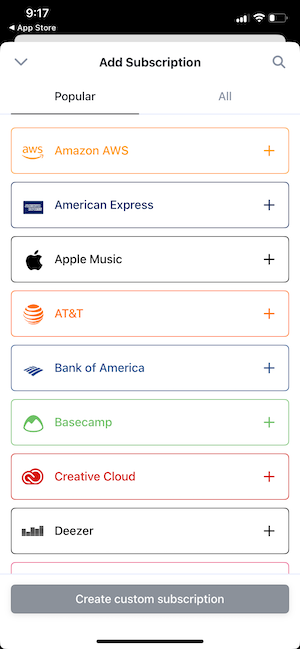
Image: Jessica Santero | WhistleOut
I did run into one niche subscription, a monthly membership at my local climbing gym, that wasn't in the library. Bobby lets you build a custom tile from scratch for exactly that situation, complete with your own icon and color.
Once you've got more than a handful of subscriptions logged, you can group them into categories, which keeps the main screen from turning into an overwhelming grid of icons.
I split mine into entertainment, fitness, and software, and finding any single subscription now takes seconds instead of scrolling through everything at once.
Not sure how to update your apps?
Keeping your apps up to date ensures you're always getting the latest features, bug fixes, and security improvements. Learn how to update the apps on your iPhone and your Android. It takes less time than you think.
The iOS-only limitation is real, but the tradeoff is worth it
Bobby is only available on iPhone, which means Android users have to look elsewhere. PocketGuard or Rocket Money are the better fit if you're on Android and want subscription tracking.
For iPhone owners, the tradeoff of manual entry over automatic bank scanning is a small price for the privacy it buys. No bank credentials leave your phone, and there's no third-party service reading your transaction history to build a subscription list on your behalf.
Who Bobby is actually for
Bobby fits anyone who wants a visual, easy way to see every subscription in one place without connecting a bank account. It's not built for automatic detection, so if you suspect you have subscriptions you've genuinely forgotten about entirely, an app like Rocket Money that scans your bank history will catch those faster.
But if you already have a rough idea of what you're paying for and just want it organized clearly, Bobby does that better than almost anything else on the market.
 How I tested Bobby
I manually entered every subscription I currently pay for into Bobby, including one niche gym membership not already in its company library, to see how the custom tile feature handled it. I used the app daily for a month to track how easy it was to add new subscriptions, organize them into categories, and check my monthly total at a glance without a bank connection.
- Manual entry speed: Timed how long it took to log a full list of subscriptions from scratch.
- Custom tiles: Tested building a tile for a subscription not already in the library.
- Privacy: Confirmed no bank or financial account connection is required at any step.
Bobby: FAQ
Does Bobby link to my bank account?
No, Bobby is built entirely around manual entry, so you never have to connect a bank account or share financial credentials to use it.
Is Bobby available on Android?
No, Bobby is currently iPhone only. Android users looking for subscription tracking should consider PocketGuard or Rocket Money instead.
How much does Bobby cost?
Bobby is free to download, with an optional one-time in-app purchase that unlocks additional features. There's no recurring monthly fee.
What happens if my subscription isn't already in Bobby's list?
Bobby lets you build a custom tile from scratch, complete with its own icon and color, for any subscription that isn't already in its built-in company library.
Jessica Santero
Staff Writer

Thousands of cell phone plans unpacked. All the facts. No surprises.

Related Articles


Related Topics
App Reviews FeaturedPopular Topics
Featured App Reviews iOS News Coverage Device Reviews Device Explainers Carrier Explainers App Roundups T-Mobile


