
Forgetting to cancel a subscription is one of the easiest ways to lose money every single month. A free trial you meant to cancel can turn into an extra charge. Or a streaming service you stopped watching keeps billing you, and before you know it, your bank statement is full of recurring charges you barely remember signing up for. Unless, of course, you already use a banking app to watch your expenses.
I personally save about $90 a month by tracking my subscriptions, and most of that savings doesn't even come from cancellations. It comes from seeing everything I'm paying for in one place. Once you can visually see how many subscriptions you're juggling, you'll stop wanting to add new ones.
I tested the 5 top apps that track, manage, and cancel subscriptions to find out which ones are actually worth your trust, and which ones you should stay far away from. Here's what I found.
Get free Netflix with T-Mobile
Did you know T-Mobile's Experience plans include a free Netflix subscription? That way you don't have to pay for additional bills; it's already in your phone plan free of charge.
Check out T-Mobile's perk-packed plans below:

Best subscription tracker apps at a glance
| App | Available on | Price | Best for |
|---|---|---|---|
| PocketGuard | iPhone, Android, and desktop | Free (limited), Plus is $12.99/month or $74.99/year | Seeing subscriptions inside your full budget, not as a standalone list |
| Rocket Money | iPhone and Android | Free (basic), Premium is $6–$12/month | Automatic detection and having a service cancel subscriptions for you |
| Bobby | iPhone only | Free, with one-time in-app purchase | Tracking without sharing bank data, for iOS users only |
How I evaluated the best subscription tracker apps
I judged each app on whether it actually helped me find and manage forgotten charges, not just list the ones I already knew about. Here's what I looked for:
- Detection accuracy: Does the app reliably surface every recurring charge, including small or infrequent ones?
- Cancellation support: Does the app cancel subscriptions for you, walk you through canceling them yourself, or just list them and leave you to figure it out?
- Privacy and bank access: Does the app require linking your bank account, and is that trade-off worth the convenience?
- Trustworthiness: Does the app actually work as advertised, with a functioning store listing and a track record that holds up?
1. PocketGuard: The best way to see subscriptions and link your bank account

3.5 out of 5 overall
- Free tier is limited (2 linked accounts, 2 categories); Plus unlocks full bank-linked automation
- Available for iPhone, Android, and desktop
PocketGuard is a full personal finance and budgeting app, but it has a dedicated section for subscription tracking. Both iOS and Android users can download PocketGuard, or you can even check it out on desktop if you'd rather look at your bank numbers on a bigger screen. It does offer a free tier, but it's limited to manual input and setup rather than the automatic bank-linked tracking the paid version offers.
I went into testing PocketGuard expecting a budgeting app but fell in love with the subscription tracker. It'd be really useful for families that have several subscriptions (or are testing several free trials) and don't want to overspend on too many services.
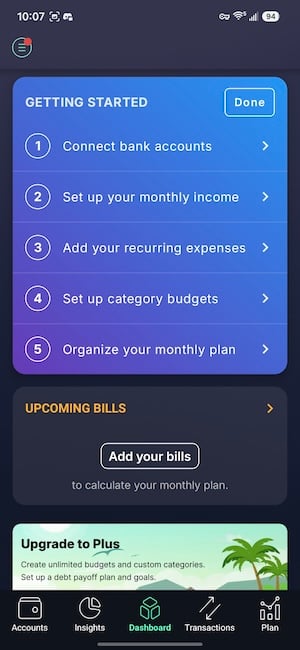
Image: Jessica Santero | WhistleOut
The free tier is based on manually entering your accounts and expenses yourself, which is more hands-on than I expected from an app that's so well-known. The dashboard still leads with your overall spending, income, bills, and how much you have left over. Just know that you're responsible for inputting your bills rather than having them pulled in automatically.
PocketGuard is used and loved by a lot of my friends and family, and they swear by it.
If you opt for a subscription, PocketGuard is convenient for tracking subscriptions because it has a dedicated tab just for them. It shows all of your subscription expenses on one screen, so you can see exactly where your money is going without digging through a bank statement. Its use of AI technology for expense identification automatically reviews your transaction history.
What Reddit says about PocketGuard
Reddit users can't rave enough about PocketGuard. One commenter in r/PocketGuard finally found an app that helped them stick to budgeting, saying, "The one that actually clicked was PocketGuard. What sold me wasn't a budgeting feature at all; it was that it categorizes everything automatically, so I barely have to touch it, and then shows me exactly where the money went that month... There's also a leftover number that tells you what's safe to spend."
It isn't a cheap service, and the cost adds up over a year. I personally prefer a financially geared budgeting app like YNAB or Quicken, but PocketGuard is used and loved by a lot of my friends and family, and they swear by the paid version specifically for the automation it offers.
But if you're willing to put in the manual work, the free tier is a great way to get a dedicated subscriptions tab without paying anything.
Not sure how to cancel subscriptions on iPhone and Android? Check out our guide to cut down on subscription services and start saving.

"PocketGuard is convenient for tracking subscriptions because it has a dedicated tab for you to approve. It shows you all of your subscription expenses in one screen so you can see exactly where your money is going. Its use of AI technology automatically reviews your history so you don't have to manually go through your bills."
Jessica Santero, WhistleOut Staff Writer
Disney+, Hulu, and ESPN+ for $10 at Verizon
Verizon may not include streaming perks with its plans, but you get access to a bunch of discounted perks—starting at $10 per month. By far the best value is the bundle of Disney+, Hulu, and ESPN+ so the whole family can keep up with the latest shows and programs.
Check out the most popular Verizon phone plans to switch and start streaming.

2. Rocket Money: The app that finds subscriptions you forgot you had
3.0 out of 5 overall
- Free (basic tracking); Premium unlocks cancellation and bill negotiation
- Available for iPhone and Android
Rocket Money is a budgeting app that specifically targets subscription overspending. Budget-making and expense tracking are part of how this app works, but the two best features of Rocket Money are subscription cancellation and bill negotiation. Once you link your bank accounts, Rocket Money scans your transactions and shows you every recurring charge it finds, including free trials you forgot you ever agreed to.
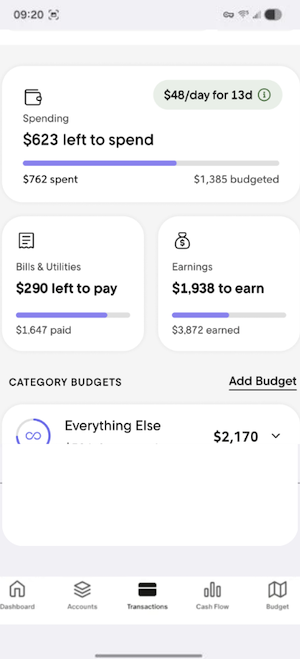
Image: Jessica Santero | WhistleOut
The best part is that this app will cancel your subscriptions and heckle your internet provider for a discount, for you. The app lays everything out by category, so you're not just seeing a list of charges; you're seeing how those charges fit into your broader spending.
Rocket Money connects to your bank accounts, scans your transactions, and lines up every recurring charge on one screen.
Depending on which features you want to use, Rocket Money charges on a sliding scale. You pick where on that scale you want to land and what services you plan on using. Plus, you can cancel subscriptions directly through the app without having to track down each company individually.
The catch is the bill negotiation feature, which takes a cut of your first year's savings as its fee. But you're paying for someone else to do the legwork, so decide whether that convenience is what you're after before you negotiate. If you'd rather do the canceling yourself and skip the fee entirely, the free tracking features alone are still useful for surfacing charges you'd otherwise miss.
What Reddit says about Rocket Money's bill negotiation
Subscription cancellation and bill negotiation are bittersweet services with Rocket Money. On one hand, you don't have to put up with horrible customer service. But on the other hand, Rocket Money takes a part of your savings as a commission. One user complained in r/personalfinance, "It will cancel the subscriptions, but it'll charge you for canceling (we saved you $400 a year so 'give us half of those savings'). So it is and isn't a scam... You do get canceled subs, but you also pay for it. Why don't you just import two months' bank statements into AI and find recurring charges?"
Switch and start saving on unlimited data
Your phone bill is one of the easiest recurring charges to cut down on. Before you audit your subscriptions, take a look at what you're paying for wireless service.
Here are some of the most affordable plans available right now:


3. Bobby: The best way to track subscriptions without sharing your bank details
4.0 out of 5 overall
- Free
- Available for iPhone only
Bobby is a subscription tracker built for people who don't want to overshare personal bank details or financial data with an app. As a data-sharing-phobe, I try to avoid uploading anything to the cloud and avoid connecting my bank details when they aren't necessary. Since you manually enter each subscription with Bobby (the cost, your first payment date, and when the billing cycle repeats), you don't forget or lose track of what you're paying for.
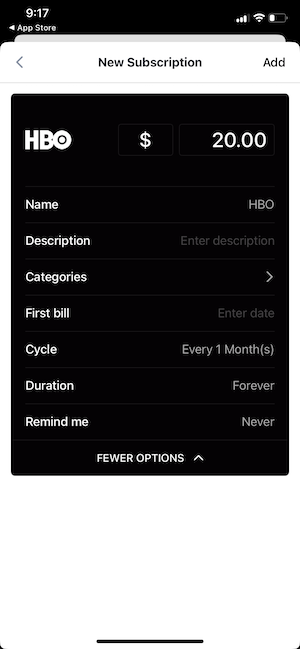
Image: Jessica Santero | WhistleOut
The app itself is visually pleasing, with movable icon tiles that make managing subscriptions feel more like arranging a home screen than doing your finances. And the built-in company list covers almost everything under the sun. If something is too niche to already be listed, like my Mesa Rim climbing membership, you can just make your own tile in seconds. Once your list gets long enough to feel cluttered, you can sort everything into categories and keep it organized that way.
What Reddit says about Bobby Subscription Tracker
Bobby is a free app that's worth downloading, according to redditors in r/iosapps. One commenter explained why it's the best, saying, "Bobby is the gold standard for tracking subs manually. Bobby makes you enter every subscription by hand and keep it current yourself."
Protect your data with Bobby, especially in a day and age when apps can easily look like scams.
Apple users get to enjoy Bobby since it's iOS-only, which means Android users miss out entirely and will need to look elsewhere on this list. And once you find subscriptions you want to cancel, just follow our step-by-step guide to canceling subscriptions on an iPhone.
"I am thoroughly shocked by this app. As a data-sharing-phobe, I try to avoid uploading anything to the cloud and avoid connecting my bank details when they aren't necessary. Bobby lets you keep a running list of your subscriptions so you don't forget or lose them, without having to pay for an expensive subscription or share sensitive data."
Jessica Santero, WhistleOut Staff Writer
How to get a cheap new phone
You don't have to pay full price for a new phone. Carriers offer major discounts year-round so you can save on an upgrade and get solid service.
Check out the best deals on cell phones below:
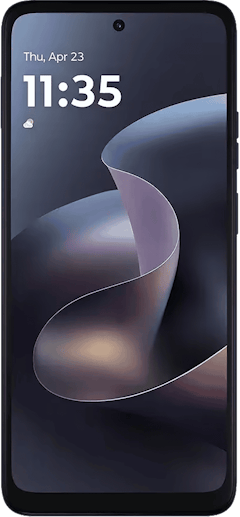
- 6.7 inch display
- Rear Cameras: 50MP, 2MP
- Front Camera: 16MP
- 6.7 inch display
- Rear Cameras: 50MP, 2MP
- Front Camera: 32MP
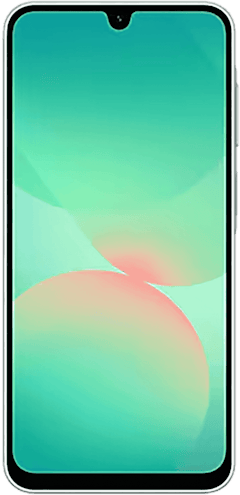
- 6.7 inch display
- Rear Cameras: 50MP, 8MP, 2MP
- Front Camera: 13MP

Apps to avoid
Not every app that shows up when you search for a subscription tracker deserves your trust, or your bank information. Here are two I tested and can't recommend, along with why.
ReSubs
ReSubs isn't broken or fraudulent, and it does work on both the App Store and Google Play, but that's about the nicest thing I can say about it once you put it side by side with PocketGuard. Getting to ReSubs' free tier is honestly confusing, and once you're in, you're bombarded constantly with ads pushing you to upgrade to premium. The whole experience feels designed to trick you into paying rather than actually helping you track anything. You need to find the + Subscription button to get started with free manual entry, but once you're in, ReSubs is a clumsier version of Bobby and an unpolished version of PocketGuard.
Wallet: Budget Tracker by BudgetBakers
Wallet by BudgetBakers is a widely downloaded budgeting app, but it's earned some serious red flags along the way. Reddit users have posted direct warnings about their experience with the app, stating, "Back in March, I bought a lifetime pass for the Wallet app by BudgetBakers after trying the 14-day trial, in which the bank sync with my bank worked fine.
But after payment, the bank sync failed to reconnect."
For an app asking for your linked bank accounts and financial history, that combination isn't one I'm comfortable recommending.
 How I evaluated these apps
I personally use a subscription tracker daily, and I tested each app in this piece on my own accounts and subscriptions to see how accurately it surfaced recurring charges. Where an app claimed to cancel subscriptions or negotiate bills on my behalf, I looked into how that process actually works, including any fees involved. I also checked each app's official store listings directly and cross-referenced user reports before recommending, or specifically avoiding, an app.
Why you can trust WhistleOut
.svg)
15+
years of mobile industry experience

900+
published wireless guides

35+
firsthand carrier reviews
We've been around since the birth of the iPhone. Along the way, we've learned how to spot the best deals for your wallet (and your sanity). We spend our days researching informative guides and writing insightful reviews on every kind of wireless plan, distinguishing what matters from what doesn't. We played around with these plans before recommending them, ensuring they're worth your hard-earned money.
Want to know more? Check out how we review every cell phone plan we rank.
Best apps to track and cancel subscriptions: FAQ
Do subscription cancellation apps actually cancel subscriptions for you?
Some apps can cancel subscriptions for you. Rocket Money offers a cancellation concierge that contacts companies directly on your behalf.
Are subscription tracker apps safe to link to my bank account?
Reputable apps like PocketGuard and Rocket Money use bank-level encryption and read-only access through services like Plaid, making them safe to link your account to. If you'd rather not link your bank at all, Bobby lets you track subscriptions manually with no bank connection required.
What's the best free app to track and cancel subscriptions?
PocketGuard is the best free app to track subscriptions on Android phones, while Bobby is the best option for iPhone users.
Will canceling a subscription through a third-party app actually work?
Yes, canceling a subscription through a third-party app works, but only when you use a legitimate app like Rocket Money. That said, always confirm the cancellation went through by checking for a confirmation email or checking your account directly with the subscription provider.
How much money can I save by using a subscription tracker?
Savings vary depending on how many forgotten subscriptions you've got, but many people could save $50–$100 per month simply by seeing everything they're paying for in one place.
Jessica Santero
Staff Writer

Thousands of cell phone plans unpacked. All the facts. No surprises.
Related Articles


Related Topics
App Roundups FeaturedPopular Topics
Featured App Reviews iOS News Coverage Device Reviews Device Explainers Carrier Explainers App Roundups T-Mobile


