
iCloud and Dropbox are both cloud storage services, but one is built into every iPhone and the other is a third-party alternative built for sharing files across any device. As we've tackled how Apple's services match up against rivals, cloud storage is a category where the tradeoffs are especially easy to feel. We looked at how iCloud and Dropbox handle backups, storage, and file sharing to see where each one holds up.
Overall, iCloud isn't necessarily better than Dropbox, and these services can easily meet different needs. Most users should consider using both whether they're backing up devices or collaborating with others on a project.
If you have an iPhone, iCloud wins if you want your photos, files, and backups to automatically save and sync across your Apple hardware. It's the best system for personal cloud storage. Dropbox is the better choice when someone outside the Apple ecosystem needs access to those same files or wants to work in collaboration with you, since it works the same on Windows, Android, Mac, and iPhone alike.
We recommend: iCloud for Apple households, Dropbox for cross-platform sharing
Stick with iCloud if you're all-in on Apple devices and want backups and photos to sync without thinking about it. The service is designed to seamlessly save your most important data as you use your Apple devices, without requiring you to pick what to save. You should switch to Dropbox if you regularly share files with people on Windows or Android devices, or need real version control and collaboration features iCloud doesn't offer.
Quick comparison
iCloud:
- Built into every iPhone, no download or separate account required
- 5GB of free storage for every Apple ID
- Automatically syncs photos, files, messages, and passwords across Apple devices
- iCloud+ plans start at just $0.99/month for 50GB
- Doesn't sell your data, and includes privacy perks like Private Relay and Hide My Email
- Limited cross-platform functionality with Windows and Android
- Collaboration features largely limited to other Apple devices
Dropbox:
- Works the same on iOS, Android, Windows, Mac, and Linux
- Built for sharing and collaborating on files with anyone, regardless of platform
- 4.7-star rating on the iOS App Store with almost 950,000 reviews
- Millions of downloads and a well-established track record
- Only 2GB of free storage, less than half of iCloud's free tier
- Paid plans start higher than iCloud+, with Dropbox Plus at $11.99/month for 2TB
- Requires its own separate account and app download
- Doesn't sync Apple-specific data like Messages or Keychain passwords
iCloud is best for automatic backups within the Apple ecosystem
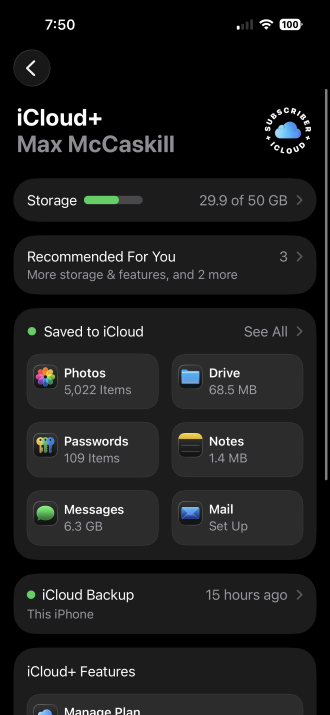
Image: Max McCaskill
iCloud's best feature is it works without you doing anything, as long as you're using an Apple device. Sign in with your Apple ID and photos back up automatically, files sync through iCloud Drive, and your saved passwords carry over through iCloud Keychain. While it does have some collaborative aspects, it's mostly designed to save your personal devices, data, and documents safely in cloud storage. Upgrading beyond the free 5GB for more room is fairly inexpensive across the board.
iCloud storage pricing
| Storage | Price |
|---|---|
| 50GB | $0.99/mo. |
| 200GB | $2.99/mo. |
| 2TB | $9.99/mo. |
| 6TB | $29.99/mo. |
| 12TB | $59.99/mo. |
The main drawback of iCloud is that it's tightly tied to Apple hardware. The service's apps on Windows and Android are limited, and none of that seamless syncing carries over once someone outside the Apple ecosystem needs access to your files. For group projects, iCloud does offer shared folders with real-time collaboration through apps like Pages, Numbers, and Keynote, but that collaboration works best when everyone involved is also on an Apple device.
Photo and video backups add up fast
Automatic photo and video backups are convenient, but they can chew through your iCloud storage and your data plan faster than people expect, especially over cellular.
Check out our guide to the best MVNOs and compare plans below:
|
Visible

$25 Visible Plan
$25.00/mo
Taxes & Fees included
|
|
Mint Mobile

Unlimited Data Plan
$10.00/mo
$60 for 6 months of service
|
|
Spectrum Mobile®

Unlimited Plus
$40.00/mo
+ $20 Upfront
|
Dropbox is best for cross-platform file sharing
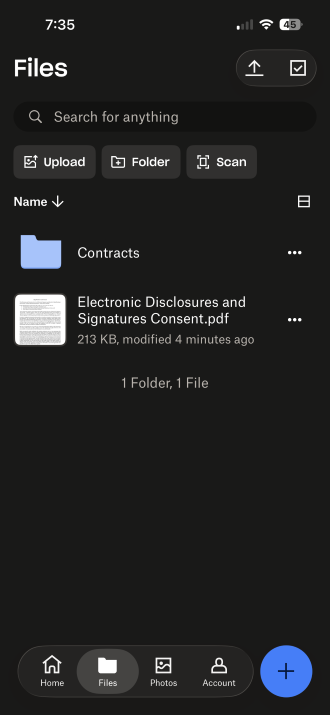
Image: Max McCaskill
Dropbox works identically whether you're on an iPhone, an Android phone, a Windows PC, or a Mac. It's the strongest pick whenever you're sharing files with anyone outside the Apple ecosystem, whether that's a coworker on a Windows laptop or a friend with an Android phone. Dropbox has earned its spot as one of the best organization apps around, with a 4.7-star rating on the iOS App Store and almost 950,000 reviews to back it up.
Dropbox's collaboration tools also work the same regardless of what platform anyone's on. While iCloud's shared folders and real-time documents are built around Apple's apps, Dropbox doesn't have that limitation. Users can co-edit documents, leave notes, and manage projects in real time, no matter what device they use.
As for pricing, Dropbox does offer less free storage and has higher prices. Dropbox starts you off with just 2GB of free storage, less than half of what iCloud gives every Apple ID for free. Its entry-level Dropbox Plus plan also runs $11.99 a month for 2TB, noticeably more than iCloud's $9.99 for the same 2TB tier.
Syncing files across devices relies on a solid connection
Uploading and syncing files on the go, especially larger documents or photos, depends on having enough data to keep things moving without a slowdown.
Compare the top unlimited family plans built for households that lean on cloud storage:
|
Verizon

Simplicity Plan
$120.00/mo
+ Taxes & Fees. Price includes AutoPay & Bring a Number discount
|
|
T-Mobile

Essentials Saver 2.0
$100.00/mo
with Auto-Pay - Taxes & Fees NOT included
|
|
Spectrum Mobile®
Unlimited Plus
$160.00/mo
+ $80 Upfront
|
How to get each service running
iCloud doesn't need a download at all, since it's built into every iPhone. Signing in with your Apple ID automatically sets it up, though moving beyond the free 5GB tier requires subscribing to one of the iCloud+ plans.
Dropbox is a straightforward download on either app store, with a free tier to get started. Install it, create an account, and you're ready to start syncing files within a couple of minutes.


 How we tested iCloud and Dropbox
We looked at both services across everyday backups and cross-platform file sharing, including:
- Setting up automatic photo and file syncing on Apple devices through iCloud
- Sharing and collaborating on files between iPhone, Android, and Windows devices using Dropbox
- Comparing free storage tiers and paid plan pricing for both services
- Confirming which claims about privacy, collaboration features, and cross-platform support still hold up
Pricing, features, and availability may have changed since we wrote this, but we'll try our best to keep it updated.
Why you can trust WhistleOut
.svg)
15+
years of mobile industry experience

900+
published wireless guides

35+
firsthand carrier reviews
We've been around since the birth of the iPhone. Along the way, we've learned how to spot the best deals for your wallet (and your sanity). We spend our days researching informative guides and writing insightful reviews on every kind of wireless plan, distinguishing what matters from what doesn't. We played around with these plans before recommending them, ensuring they're worth your hard-earned money.
Want to know more? Check out how we review every cell phone plan we rank.
iCloud and Dropbox: FAQ
Is iCloud or Dropbox better for cross-platform file sharing?
Dropbox is the better choice for cross-platform file sharing. It works identically on iOS, Android, Windows, and Mac, while iCloud's compatibility for Windows and Android are limited.
How much free storage do iCloud and Dropbox offer?
iCloud includes 5GB of free storage for every Apple ID. Dropbox offers 2GB of free storage for personal accounts, less than half of iCloud's free tier.
Does iCloud work on Android or Windows?
iCloud has limited access for Windows and Android, but the experience isn't as seamless as it is across Apple devices. It generally requires using the Windows iCloud app or signing into your iCloud online. For regular cross-platform use, third-party apps like Dropbox are a better option.
Is iCloud free to use?
Yes, every Apple ID includes 5GB of free iCloud storage. Paid iCloud+ plans start at $0.99 per month for 50GB if you need more room.
How much does Dropbox cost?
Dropbox's free tier includes 2GB of storage. The entry-level Dropbox Plus plan starts at $11.99 per month for 2TB.
Max McCaskill
Sr. Staff Writer

Thousands of cell phone plans unpacked. All the facts. No surprises.


