
You don't need a separate app for everything from banking to financial advice and subscription tracking. PocketGuard is a budgeting app that puts all your charges inside your full financial breakdown, so a forgotten subscription stands out instead of hiding on page three of a bank statement.
I tested and reviewed several different subscription tracking apps; check out how they compare.
Why you can trust WhistleOut
.svg)
15+
years of mobile industry experience

900+
published wireless guides

35+
firsthand carrier reviews
We've been around since the birth of the iPhone. Along the way, we've learned how to spot the best deals for your wallet (and your sanity). We spend our days researching informative guides and writing insightful reviews on every kind of wireless plan, distinguishing what matters from what doesn't. We played around with these plans before recommending them, ensuring they're worth your hard-earned money.
Want to know more? Check out how we review every cell phone plan we rank.
Cut your phone bill before you cut anything else
A subscription tracker will find your forgotten charges, but your phone plan is often the biggest recurring bill you never renegotiate. Here are some of the best unlimited data plans available right now.



- Free tier is limited to 2 linked accounts and 2 categories
- Plus is $12.99/month or $74.99/year
- Available for iPhone, Android, and desktop
*Pricing reflects what PocketGuard listed at the time of testing. Check the App Store or Google Play listing for current pricing.
What is PocketGuard?
PocketGuard is a full budgeting app that tracks subscriptions as part of your entire financial picture, not as a standalone list. It links directly to your bank accounts and uses AI to automatically scan transaction history for recurring charges. It's easy to miss subscriptions you've forgotten about, especially when they pop up next to your grocery spending.
Every subscription lives in one dedicated tab
PocketGuard gives subscriptions a dedicated screen inside the app, separate from your general spending categories. Every recurring charge it detects shows up there automatically, pulled from your linked accounts without you manually entering a single bill. I tested this against my own bank statement, and it correctly flagged a $4.99 App Store charge (from an app subscription I forgot about).
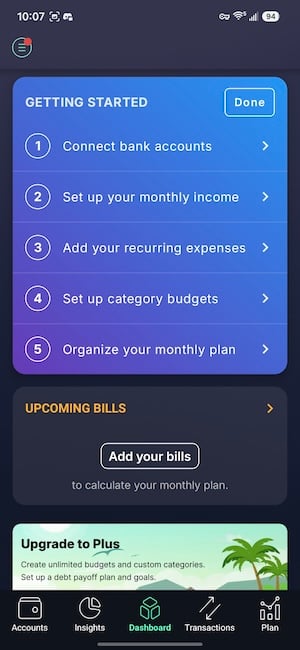
Image: Jessica Santero | WhistleOut
Just keep in mind that the AI detection isn't perfect for irregular billing cycles. A quarterly software license might not get flagged as a subscription on the first scan, so you might have to do some tagging by hand. Once tagged, though, PocketGuard remembers it correctly going forward.
Not sure how to update your apps?
Keeping your apps up to date ensures you're always getting the latest features, bug fixes, and security improvements. Learn how to update the apps on your iPhone and your Android. It takes less time than you think.
Free vs. Plus: Is the upgrade worth it?
PocketGuard's free tier limits you to two linked accounts and two spending categories, which is workable if you only have a checking account and one credit card. Anyone with a joint account, a savings account, and a couple of credit cards will hit that limit fast. Plus removes those caps and unlocks unlimited categories for a monthly or annual fee, listed above.
Paying a monthly fee for an app that helps you cancel subscriptions feels a little ironic, since it's another recurring charge on top of the ones you're trying to eliminate. The annual plan works out to a noticeably lower effective monthly cost than paying month to month, which is a more reasonable trade if you plan on using the full budgeting features long term rather than just the subscription tab.
I personally lean toward a lower-cost budgeting app, but several friends and family members use PocketGuard exclusively and won't switch.
Who should download PocketGuard
PocketGuard makes the most sense for someone who wants subscription tracking bundled with a full budgeting system rather than a standalone tool. If you already track your spending elsewhere and just want a quick list of recurring charges, an app like Bobby handles that job without the monthly fee.
If you want subscriptions viewed alongside rent, groceries, and everything else you spend money on in a single dashboard, PocketGuard's Plus tier earns its cost.
 How I tested PocketGuard
I linked my own checking account, savings account, and two credit cards to PocketGuard to see how accurately the AI detection surfaced recurring charges against my actual bank statements. I tracked which subscriptions it caught automatically, which ones needed manual recategorization, and how the free tier's two account limit held up against a real household budget over several billing cycles.
- Detection accuracy: Compared PocketGuard's automatic subscription list against my full bank statement.
- Free tier limits: Tested how quickly the 2-account, 2-category cap becomes restrictive.
- Value for cost: Weighed the Plus tier's monthly fee against comparable budgeting apps.
PocketGuard: FAQ
Is PocketGuard free to use for tracking subscriptions?
The free tier lets you link up to 2 accounts and use 2 spending categories, which covers subscription tracking for a simple setup. Anyone with multiple accounts or cards will need the paid Plus tier to remove those limits; current pricing is listed on PocketGuard's App Store and Google Play pages.
Does PocketGuard cancel subscriptions for me?
No, PocketGuard identifies and organizes your recurring charges but leaves the actual canceling to you. If you want an app that cancels subscriptions directly, Rocket Money offers that feature.
Is PocketGuard's Plus tier worth the upgrade?
It's worth it if you want subscriptions tracked inside a complete budgeting system with unlimited accounts and categories. If you only want a simple subscription list, a free or one-time purchase app will save you money.
Does PocketGuard work on Android?
Yes, PocketGuard is available on iPhone, Android, and desktop, so the subscription tracking features work regardless of which phone you use.
Jessica Santero
Staff Writer

Thousands of cell phone plans unpacked. All the facts. No surprises.

Related Articles


Related Topics
App Reviews FeaturedPopular Topics
Featured App Reviews iOS News Coverage Device Reviews Device Explainers Carrier Explainers App Roundups T-Mobile


