
Image: Max McCaskill
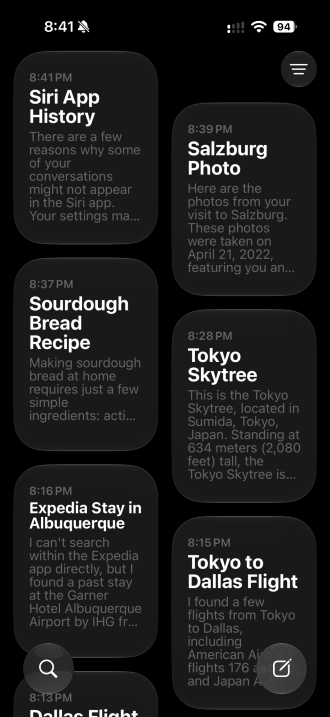
Apple's new Siri app is one of the bigger new Siri AI features in iOS 27. It saves your conversations with Siri so you can come back to them later, instead of losing everything once a chat ends. I've been using it alongside the rest of Siri AI to see whether it's actually worth opening.
After using it day to day, my take is simple: The Siri app is useful for finding previous in-depth conversations. Otherwise, I really have no reason to ever use it. For the most part, I still just press the side button and ask Siri when I have a new question.
Here's what the Siri app can do, the times I actually found it worth opening, and a few quirks that frustrated me along the way.
What the Siri app actually does
The Siri app keeps a history of your conversations with Siri AI. You can start a new chat or go back to an old one and pick up where you left off.
Your history syncs through iCloud across your iPhone, iPad, Mac, Apple Watch, and Apple Vision Pro. That means you can start planning a trip on your Mac and continue the same conversation on your iPhone later without repeating yourself.
Siri app caveats: Missing conversations and limited search
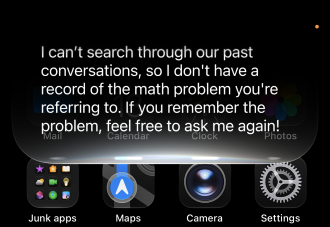
Image: Max McCaskill
The most frustrating thing I ran into with the Siri app is that it doesn't always save my conversations. In my testing, quick questions where I didn't interact with Siri after getting an answer didn't always show up.
That made it hard for me to rely on the app as a full record of everything I'd asked. If there's a conversation you know you'll want later, asking a few follow-up questions seems to make it more likely to stick.
I also found that Siri can't search through its own conversations. I asked Siri to find a math problem we'd worked through in an earlier chat, and it told me it couldn't search the Siri app. Unfortunately, that means if you want to find an old conversation, you'll have to track it down in the app yourself.
When the Siri app is worth opening
The Siri app was most helpful when I needed to find something I'd already asked about. I used it to:
- Find recipes Siri had suggested in earlier conversations
- Revisit questions I'd asked without asking them again
- Find photos I'd taken with Siri mode in the Camera app
That last one is important to note. Photos you take with Siri mode in the Camera app only save to the Siri app, not your Photos app.
Photos in the Siri app can also eventually be automatically deleted to free up space. If you're taking a picture of something you want to keep, like a receipt, take a regular photo first and use Visual Intelligence on it within the Photos app.
When you're better off just saying "Siri"
For quick questions and one-off tasks, there's no need to open up the app. I just pressed the side button to activate Siri and got my answer right away.
Most of the new Siri AI features I found most useful also work that way. Using personal context to search your texts, emails, and photos, or activating onscreen awareness to answer questions about what's on your screen do not require the Siri app at all.
It's best to think of the Siri app as a digital filing cabinet. It's handy when you need to find a specific earlier conversation, but it's easy to forget about the rest of the time.
Siri AI app: FAQs
What is the Siri app on iPhone?
The Siri app is part of Siri AI in iOS 27. It saves your conversation history with Siri, letting you start new chats or return to old ones, and syncs that history through iCloud across your iPhone, iPad, Mac, Apple Watch, and Apple Vision Pro.
Does the Siri app save all of my conversations?
No, the Siri app doesn't save every conversation. In my testing, quick questions where I didn't interact with Siri after getting an answer didn't always appear in the app. Longer conversations with follow-up questions were more reliable.
Where are photos from Siri mode in the Camera app saved?
Photos taken with Siri mode in the Camera app are saved in the Siri app, not the Photos app. They may also be deleted automatically over time, so take a regular photo if you want to keep a permanent copy.
Max McCaskill
Sr. Staff Writer

Thousands of cell phone plans unpacked. All the facts. No surprises.


